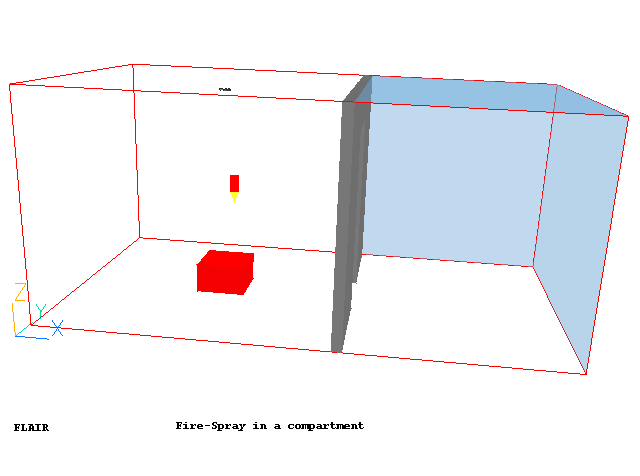
This example provides step-by-step instructions on how to activate GENTRA module, which solves the dispersed phase equations using Lagrangian methods and how to load and define the spray-head object for the simulation of fire extinction. In-Form is used to define the transient fire source which is the function of time and the concentration of the water vapour. The geometry of the case is shown in the figure below.
The size of the compartment is 2.8m long x 2.8 m wide x 2.2 m high. A sprinkler is mounted at the ceiling of the middle of the compartment. A fire source is located on the floor facing the sprinkler. There is a wall on the right with a door to the open space.
The simulation starts with a growing fire source before the water spray starts when the spray link temperature exceeds 50C. The entire simulation lasts for 120 seconds.
Setting up the model
Start FLAIR with the default mode of operation
The FLAIR VR-Environment screen should appear, which shows the default domain with the dimensions 10mx10mx3m.
Resizing the domain
 on the movement panel and then click "Fit to window".
 To activate the physical models
a. The Main Menu panel
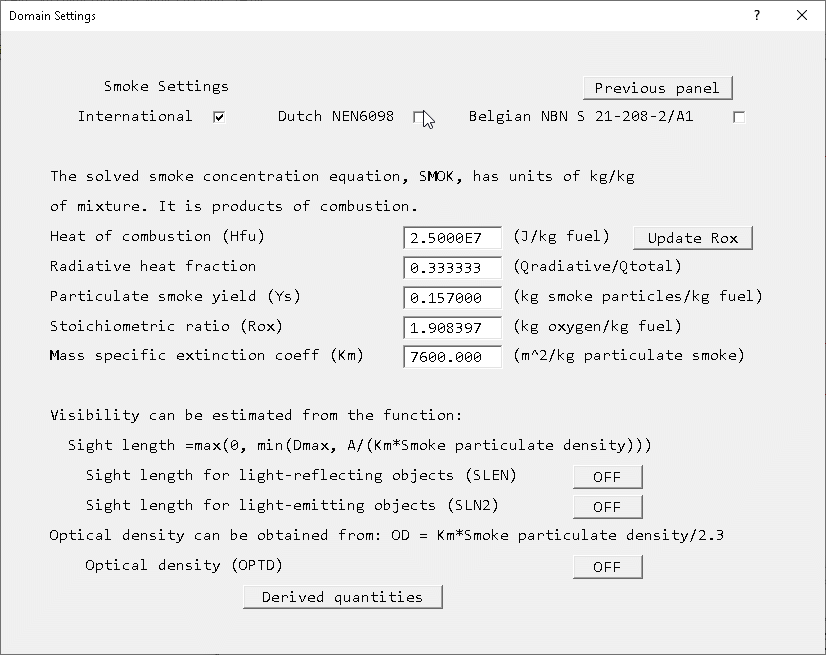
The CIBSE Guide E (2003) provides the following data:
| Material | Hfu (MJ/kg) | Yco (kg/kg) | Ys (kg/kg) |
| Timber | 13.0 | 0.020 | <0.01 - 0.025 |
| PVC- Polyvinyl chloride | 5.7 | 0.063 | 0.12 - 0.17 |
| PU- Polyurethane (flexible) | 19.0 | 0.042 | <0.01 - 0.23 |
| PU- Polyurethane (rigid) | 17.9 | 0.18 | 0.09 - 0.11 |
| PS- Polystyrene | 27.0 | 0.060 | 0.15 - 0.17 |
| PP- Polypropylene | 38.6 | 0.050 | 0.016 - 0.1 |
If the fire is to represent burning timber, set the 'Heat of Combustion' to 1.3E7 and the 'particulate smoke yield' to 0.02. Click 'Update Rox' to bring the stoichiometric ratio in line with the new heat of combustion.
b. add the spray-head
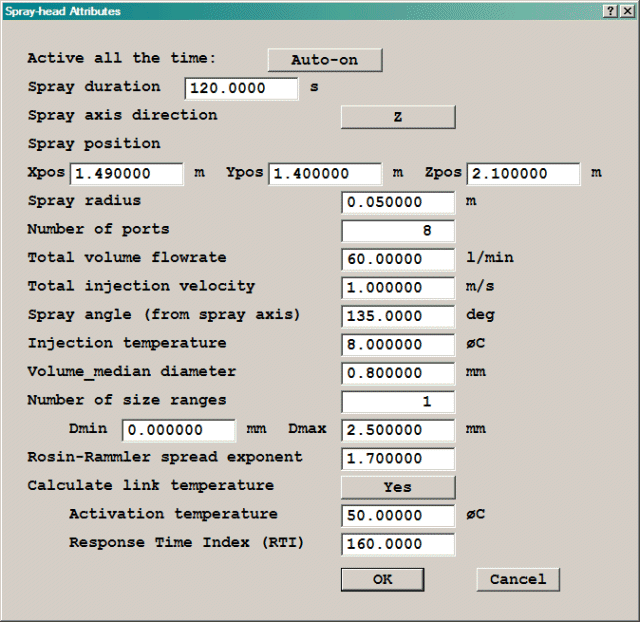
c. add the fire source
The heat source Q is a function of time (tim) and the local water vapour mass fraction (MH2O). As long as the MH2O values are near zero, the expression gives a t2 fire growth. The constant 46.9 is appropriate for a 'fast' fire. Once MH2O increases, the strength of the fire is reduced. A -500 multiplier is used to determine how much the source is reduced.
X: 0.5 m
Y: 0.5 m
Z: 0.3 m
X: 1.25 m
Y: 1.125 m
Z: 0.0 m
(exp(-500.*MH2O)*46.9*tim)*tim
then click 'File', 'Save & Exit'. An explanation of the settings made is given shortly!
whol
then click 'File', 'Save & Exit'.
(exp(-500.*MH2O)*46.9*tim)*tim*(1+rox)/hcomb
then click 'File', 'Save & Exit'.
whol
then click 'File', 'Save & Exit'.
1
onlyms
then click 'File', 'Save & Exit'.
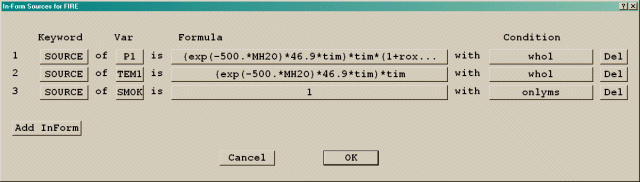
Please note that the above function is only for the purpose of demonstration. InForm is used to show how the local vapour concentration (MH2O) can be used to reduce the heat source from the fire.
The first line sets the mass source as Q*(1+stoichiometric ratio)/(heat of combustion), where rox and hcomb are the internal menu names. The second line sets the heat source, and the last line sets the mass fraction of combustion product in the incoming stream to 1. The 'whol' qualifier means that the source is a total source for the object. The 'onlyms' qualifier means that the quantity set by the source is convected in by the associated mass source. For more information on InForm, click here.
d. create the wall with a door
The wall is made of three blockages.
X: 0.1 m
Y: 1.03 m
Z: tick 'to end'
X: 2.8 m
Y: 0.0 m
Z: 0.0 m
X: 0.1 m
Y: 1.05 m
Z: tick 'to end'
X: 2.8 m
Y: tick 'at end'
Z: 0.0 m
X: 0.1 m
Y: 0.72 m
Z: 0.37 m
X: 2.8 m
Y: 1.03 m
Z: tick 'at end'
e. add the wall on the high-Y side
X: 2.8 m
Y: 0.0 m
Z: tick 'to end'
X: 0.0 m
Y: tick 'at end'
Z: 0.0 m
f. add the wall on the low-Y side
This wall is made by the duplicating method.
X: 0.0 m
Y: 0.0 m
Z: 0.0 m
g. add the wall on the low-X side
X: 0.0 m
Y: tick 'to end'
Z: tick 'to end'
X: 0.0 m
Y: 0.0 m
Z: 0.0 m
h. add the floor
X: tick 'to end'
Y: tick 'to end'
Z: 0.0 m
X: 0.0 m
Y: 0.0 m
Z: 0.0 m
i. add the ceiling
This is made by the duplicating method.
X: 0.0 m
Y: 0.0 m
Z: tick 'at end'
j. add the openings
These objects will provide the boundary conditions to the open space.
X: 2.1 m
Y: 0.0 m
Z: tick 'to end'
X: 2.9 m
Y: tick 'at end'
Z: 0.0 m
Now we create other openings by the duplicating method.
X: 2.9 m
Y: 0.0 m
Z: 0.0 m
X: 0.0 m
Y: tick 'to end'
Z: tick 'to end'
X: tick 'at end'
Y: 0.0 m
Z: 0.0 m
X: tick 'to end'
Y: tick 'to end'
Z: 0.0 m
X: 2.9 m
Y: 0.0 m
Z: tick 'at end'
k. To set the grid numbers and to solver parameters
| X | Y | Z | |
| Total number of cells | 31 | 21 | 17 |
| Region 1 | 10 (Power -1.2) | 7 | 3 |
| Region 2 | 2 | 1 | 11 |
| Region 3 | 1 | 2 | 2 |
| Region 4 | 2 | 1 | 1 |
| Region 5 | 10 (Power 1.2) | 2 | (n/a) |
| Region 6 | 1 | 1 | (n/a) |
| Region 7 | 5 (Power 1.5) | 7 | (n/a) |
Note that the number of regions were generated automatically based on how the objects divide the domain in each direction. To set the grid in the regions, click 'Edit all regions in' for each direction in turn.
Variable MH2O TEM1 LINEAR 0.3 0.25 MAXINC 0.5 10
 and set the Monitor-cell location:
= 14, J = 11, K = 8
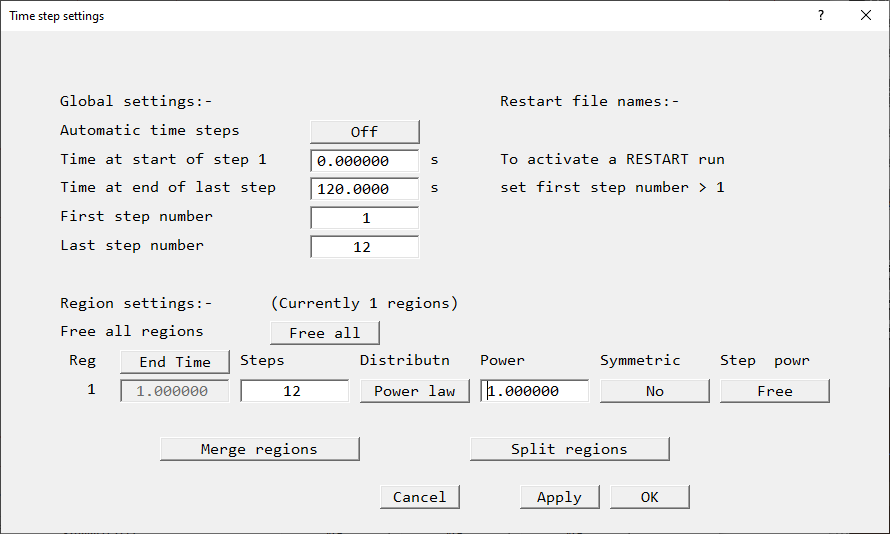
Set 'Step frequency' to 1.( Zero for first and last step means always start at step 1 and end at the last step).
Running the solver
To run the PHOENICS solver, Earth, click on 'Run', then 'Solver', then click on 'OK' to confirm running Earth. These actions should result in the PHOENICS Earth monitoring screen.
As the Earth solver starts and the flow calculations commence, two graphs should appear on the screen. The left-hand graph shows the variation of solved variables at the monitoring point that was set during the model definition. The right-hand graph shows the variation of errors as the solution progresses.
Viewing the results
 followed by the 'Contour toggle' button,
  .
. . The animation
will start which shows that the temperature increases with time first and then decreases
as soon as the spray has started.
. The animation
will start which shows that the temperature increases with time first and then decreases
as soon as the spray has started. 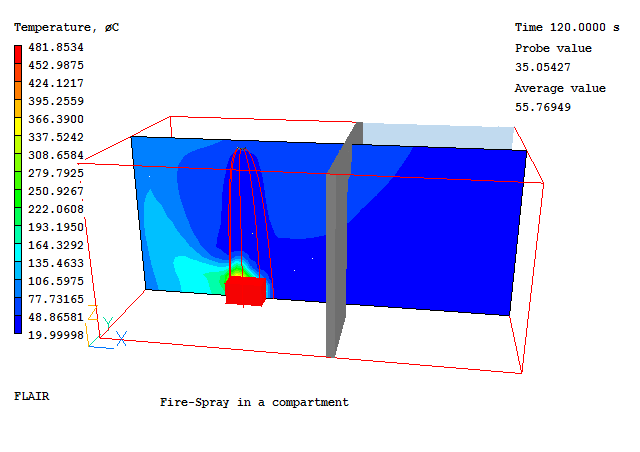
Saving the case
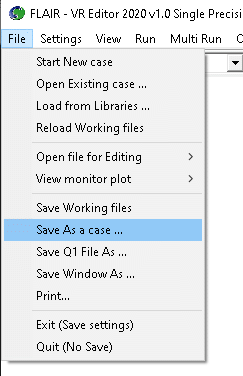
Once a case has been completed, it can be saved to disk as a new Q1 file by 'File - Save working files'. The Q1 and associated output files can be saved more permanently by 'File - Save as a case'.