Encyclopaedia Index

PHOENICS Overview
CHAM Technical Report: TR 001
Contents
- What PHOENICS is
- How PHOENICS differs from other CFD packages
- The components of PHOENICS
- Modes of operation
- Getting started
- Physical and mathematical content of PHOENICS
- Special-purpose versions of PHOENICS
- Sources of further information
click here to skip extended Contents list.
Extended Contents
- What PHOENICS is
- How PHOENICS differs from other CFD
packages
- The components of PHOENICS
- The main modules
- The inter-communication files
- Auxiliary modules
- Additional files
- The options
- Modes of operation
- Distinguishing the modes
- Command
- Q1-editing
- Text-interactive
- Menu-interactive
- PLANT-using
- Own-Fortran-using
- Input from CAD
- Input from grid-generation packages
- Output to graphics-display packages
- Getting started by way of:
- the VR-Editor
- the command mode
- Physical and mathematical content of PHOENICS
- Conventional features
Less-conventional features: physics
- Multi-phase flows
- Turbulence
- Radiation
- Chemical reaction
Less-conventional features: mathematics
- "Parabolic, Hyperbolic Or Elliptic"
- Body-fitting
- Fine-grid embedding
- Parallel processing
- Special-purpose versions of PHOENICS
- Introduction
- Chemical-vapour-deposition reactors
- Electrolytic smelters
- Heat, air and smoke flow in buildings
- Cooling of electronics
- Sources of further information
1. What PHOENICS is
- PHOENICS is a general-purpose software package which uses the
techniques of CFD (i.e. Computational Fluid Dynamics) to predict
quantitatively:
- how fluids (air, water, steam, oil, blood, etc) flow
in and around:
- engines,
- process equipment,
- buildings,
- human beings,
- lakes, river and oceans,
- and so on;
- what are the associated changes of temperature and of
chemical and physical composition;
- Its name is an
acronym for
Parabolic Hyperbolic Or Elliptic Numerical
Integration Code Series,
wherein "parabolic", "hyperbolic" and
"elliptic" are the words which mathematicians use to distinguish the
underlying equations.
However, the mention of equations does not imply that PHOENICS
is intended for mathematicians.
- PHOENICS is indeed employed primarily by:-
- scientists for interpreting their experimental
observations;
- engineers for the design of aircraft and other vehicles, and
of equipment
which produces power or which processes materials;
- architects for the design of buildings;
- environmental specialists for the prediction, and if possible
control, of environmental impact and hazards; and
- teachers and students for the study of fluid dynamics,
heat transfer, combustion
and related disciplines.
- PHOENICS has been continuously marketed, used and developed since
1981. Many, but surprisingly not all (e.g. the parabolic
option) of its original features have found their way into competitive
codes; but
its newer ones (e.g. In-Form, MUSES, IMMERSOL) remain unique.
- PHOENICS is also used as the 'computational engine' of special-purpose
software packages, whether its own, such as FLAIR for heating,
ventilating and air-movement simulation, or within other company's
packages, such WINDSIM, for wind-farm simulation.
2. Distinguishing PHOENICS from other CFD and solid-stress codes
Since there now exist many commercial software packages which perform
some of the functions as PHOENICS, newcomers may welcome the following
indications of the respects in which PHOENICS is different, and in many cases
unique.
The topics discussed are:
- Relational Data Input
- Multiply-shared space: MUSES
- The automatic new-FORTRAN writer: PLANT
- Input of data via formulae: In-Form
- Input of data via the Virtual-Reality Editor
- PARSOL; fitting curved surfaces into cartesian grids
- MOFOR: moving objects through cartesian grids
- The parabolic option
- Fine-grid embedding
- Wall-distance and -gap calculation
- Radiative heat transfer
- Turbulence; the LVEL model
- Turbulence; the MFM model
- How many phases
- Chemical reaction
- The Input-File library
2.1 Relational Data Input
Whereas other packages, and PHOENICS itself until 2007, allow the setting up of single-instance flow-simulation scenarios, the user of the new PHOENICS can set up classes of scenarios, of which sub-sets are selected by way of user-chosen parameters.
These, which are designed for particular classes of would-be flow simulators,
are designed to provide their users with just what they need and no more,
thereby enabling persons without specific CFD expertise to benefit from CFD.
Unique to PHOENICS is the
MUSES (Multiply-SharEd Space),
technique
which allows many fluids to flow within the same space, as for example
in the heat exchanger shown below, in which the solid stresses
may also be computed simultaneously.
The input file is library Case z604. Click
here in
order to inspect it.
MUSES has been employed for the construction of the
PHOENICS-special-purpose version,
SAFIR, for blast- and
other shaft furnaces.
2.3 User-supplied coding
Whereas many codes now enable users to supply their own sub-routines
(a facility pioneered by PHOENICS in 1981), only PHOENICS has an
automatic new-Fortran-writing facility (i.e.
PLANT) which makes it
unnecessary for the user even to understand Fortran.
2008 update
It should be remarked that, although PLANT is still available; and is much used by its devotees, it has been greatly surpassed by its successor, In-Form, the use of which CHAM recommends.
The following example shows a small fraction of the
PLANT-generated Fortran coding for the just-mentioned heat-exchanger
simulation.
C      Property name: PRPT05
      IF(ISTEP.GE.1       .AND.ISTEP.LE.LSTEP   ) THEN
       IF(IZ.GE.1       .AND.IZ.LE.NZ      ) THEN
       LFMARK=L0F(INAME('MARK'))
       LFVISL =L0F(AUX(VISL  ))
       LFU1  =L0F(U1    )
       LFV1  =L0F(V1    )
       LFWDIS=L0F(INAME('WDIS  '))
       DO 90605 IX=IXF     ,IXL
        IADD=NY*(IX-1)
       DO 90605 IY=IYF     ,IYL
        I=IY+IADD
       L0VISL=LFVISL+I
       L0MARK=LFMARK+I
        INMARK=NINT(F(L0MARK))
         IF(INMARK.EQ.1  ) THEN
       L0U1  =LFU1  +I
       L0V1  =LFV1  +I
       L0WDIS=LFWDIS+I
       F(L0VISL  )=1.*SQRT(F(L0U1)**2+F(L0V1)**2)*F(L0WDIS)
         ENDIF
 90605  CONTINUE
       ENDIF
      ENDIF
2.4 Input of data via formulae
Also unique to PHOENICS is the In-Form facility, which is even more powerful than PLANT, yet requires no new
coding at all.
Here for example is what the user enters into the input-data file
when he or she wishes to set linearised momentum sources which
depend on:
- position (XG, YG),
- the absolute velocity (VEL),
- the individual velocity components (U1,V1),
- the local material (indicated by IMAT), and
- two pre-set constants (XIC, YIC).
PATCH(I,CELL,1,NX,1,NY,1,NZ,1,LSTEP)
(SOURCE of U1 at I is 1.E5*(VEL*(YIC-YG)-U1) with IMAT>=90!LINE)
(SOURCE of V1 at I is 1.E5*(VEL*(XG-XIC)-V1) with IMAT>=90!LINE)
The formulae following the "is" can have almost unlimited complexity.
'with IMAT>=90' means: 'for materials having identifying indices greater than or equal to 90'.
'!LINE' means: 'linearise the source so as to accelerate convergence'.
An extensive power-point description of In-Form can be seen by clicking
here.
2.5 Input of data via the Virtual-Reality Editor
The Graphical User Interface of PHOENICS facilitates the import of objects
from:
- its own large library
- CAD packages
- its own solid-modelling package, Shapemaker,
- the powerful bundled-with-PHOENICS package.
Once imported, the objects can be moved, stretched, rotated, duplicated,
grouped, given, attributes, hidden, deleted, etc.
By default, after the objects have been placed in the desired positions,
the grid adjusts itself to fit them optimally.
2.6 PARSOL:
fitting curved surfaces into cartesian grids
Of course, if bodies with curved surfaces are to be fitted into
cartesian or polar grids, something special must be done to the
equations for the obliquely-cut cells in order to procure smooth flow around
the object.
This 'something special' is PARSOL, which does away with the
'staircase-like' appearance and behaviour sometimes exhibited by other
codes.
An example of flow though an array of louvres is shown here:
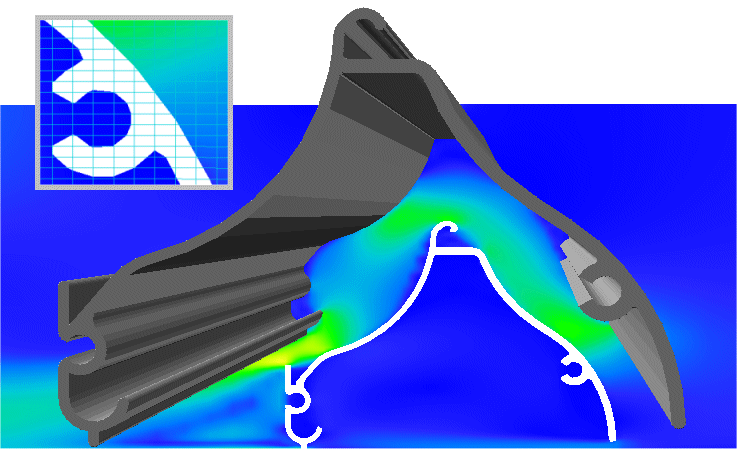
velocity contours.
Are the results from cartesian grids with PARSOL as accurate as those
from body-fitted grids?
The following simulations of laminar flow around an airfoil suggest
that they are:
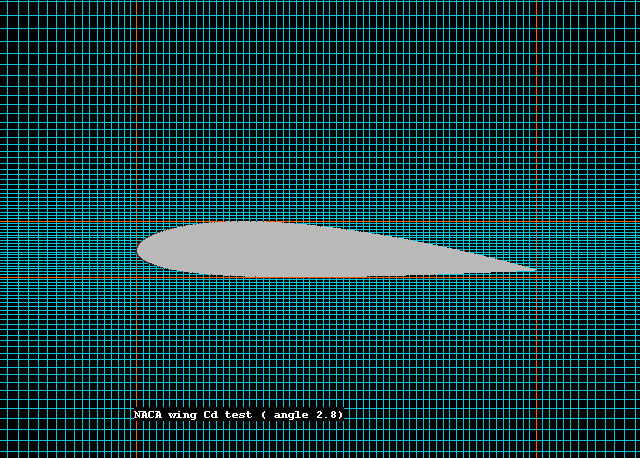 the airfoil and the cartesian grid
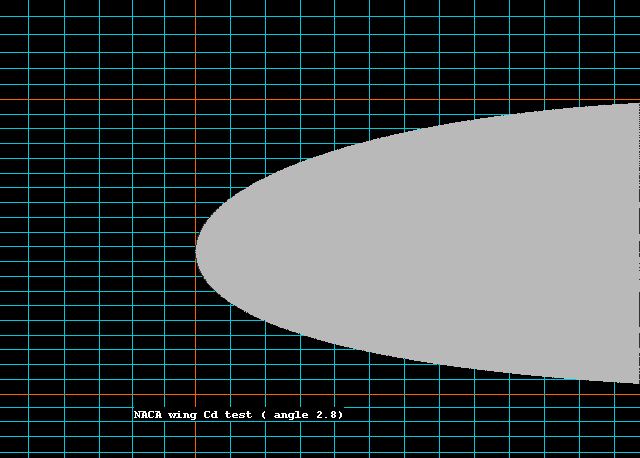 a close-up showing the obliquely cut cell edges
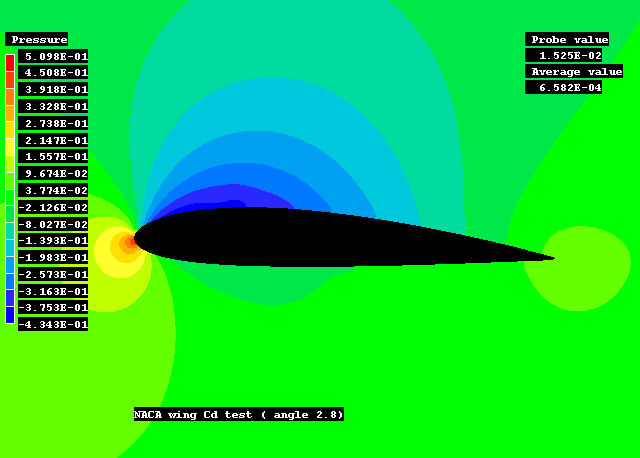 the smooth pressure distribution
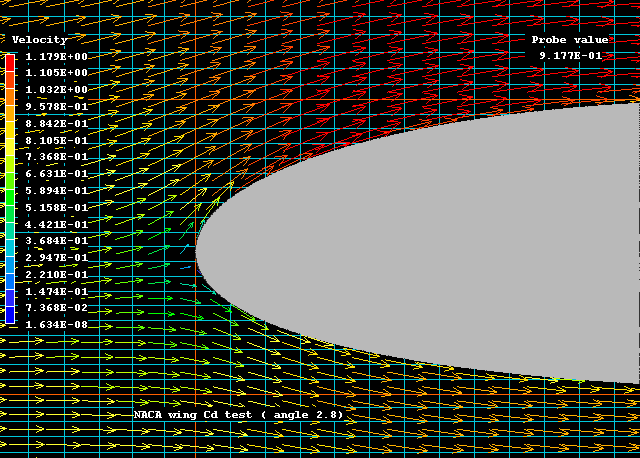 velocity vectors
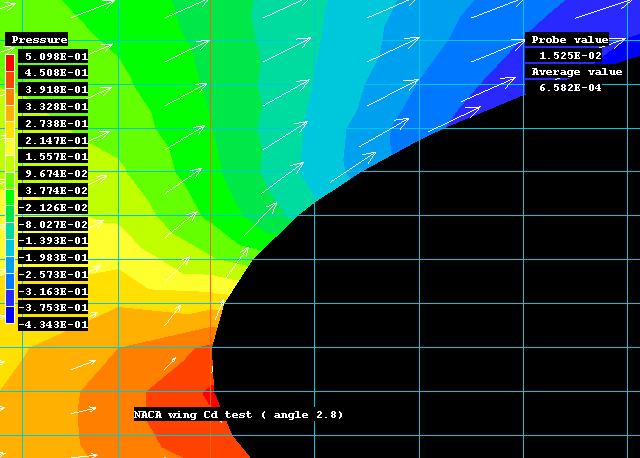 a closer look at the velocity vectors
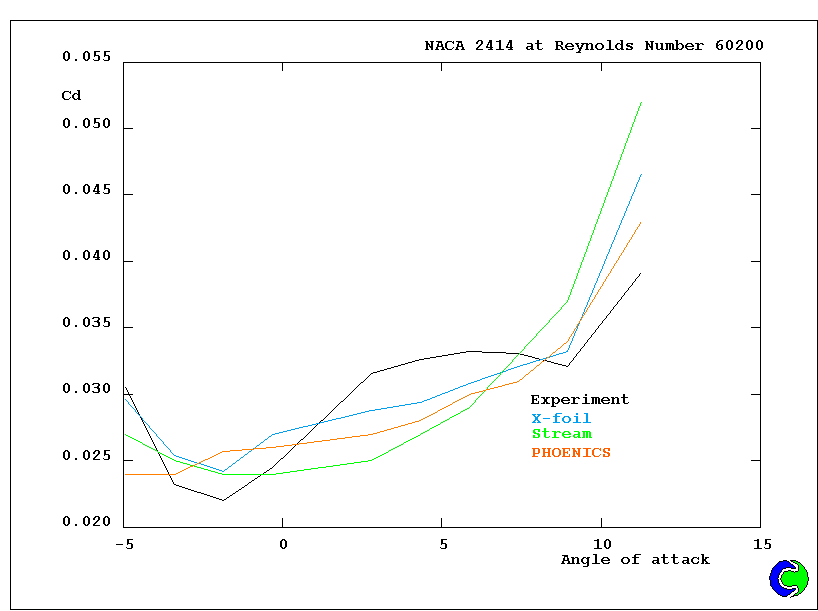 the drag coefficient at various angles of attack
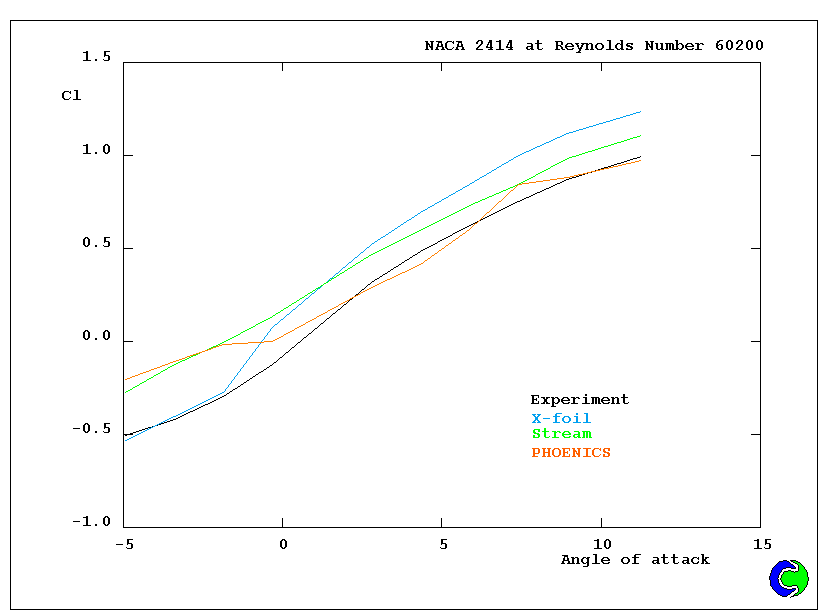 the lift coefficient at various angles of attack
2.7 MOFOR: moving objects through cartesian grids
Another capability of PHOENICS is its ability
to simulate the influence on the flow of the motion of single, many,
or articulated bodies through fluids.
Examples are:
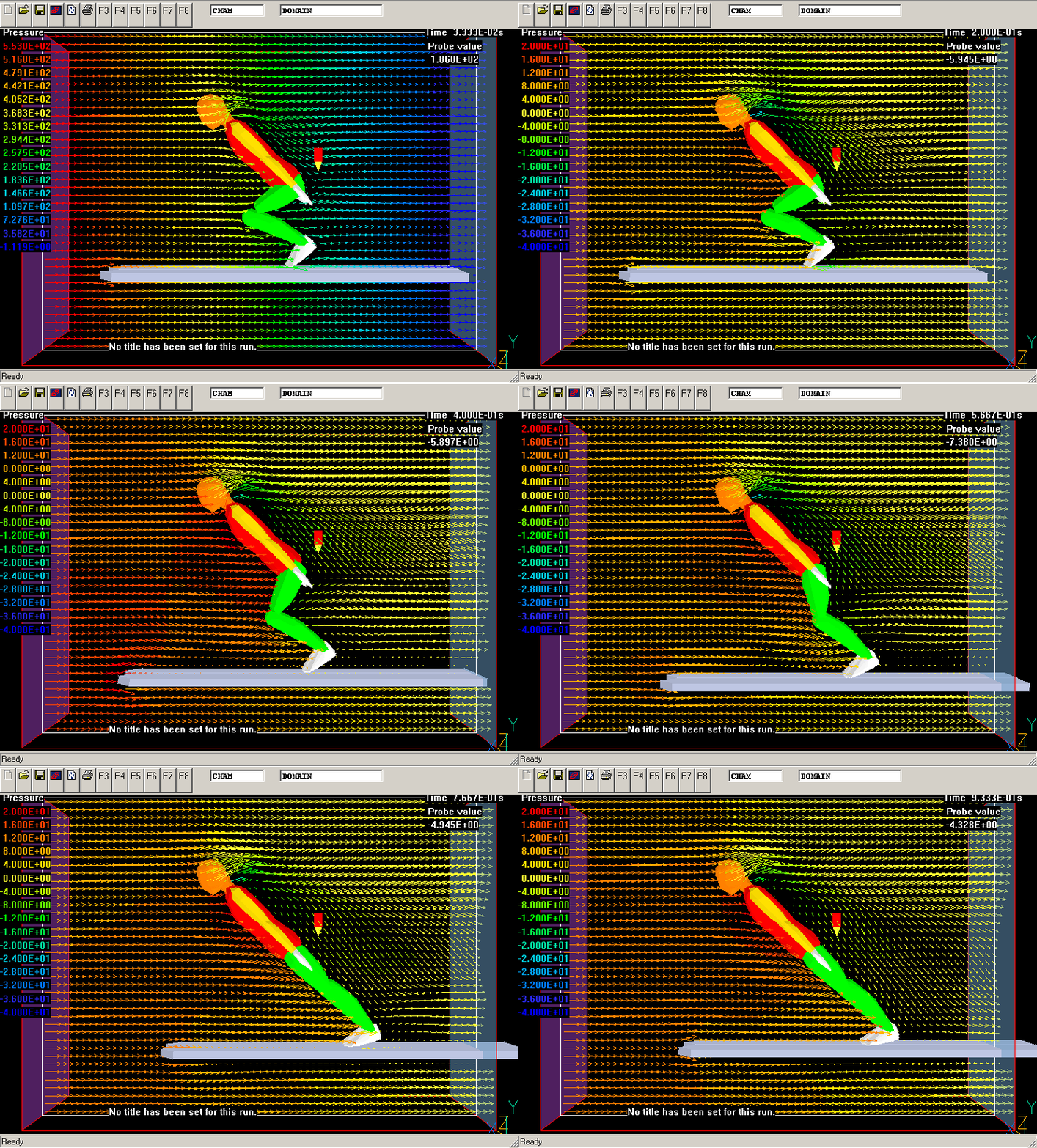 a ski-jumper
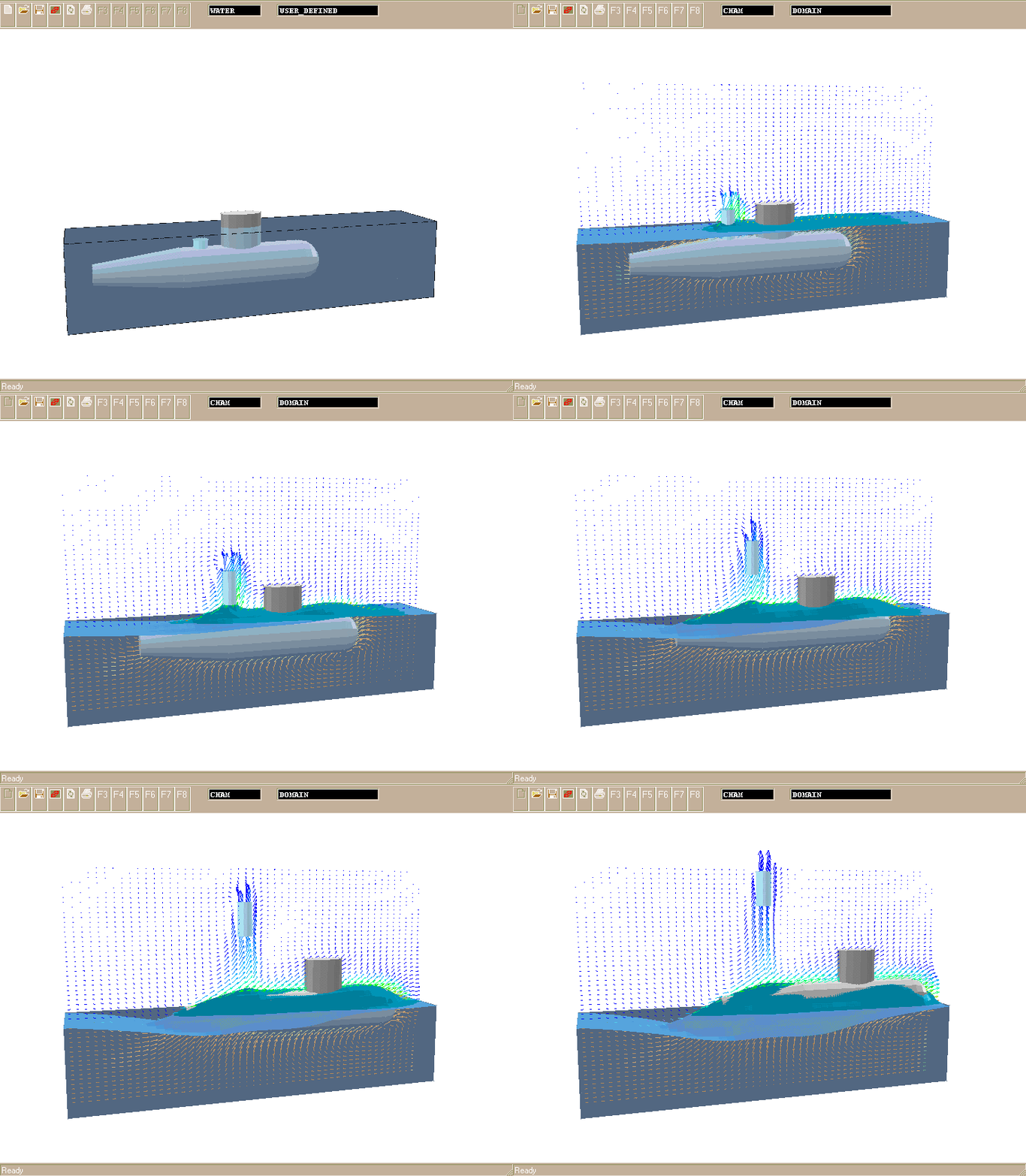 an under-water missile launch
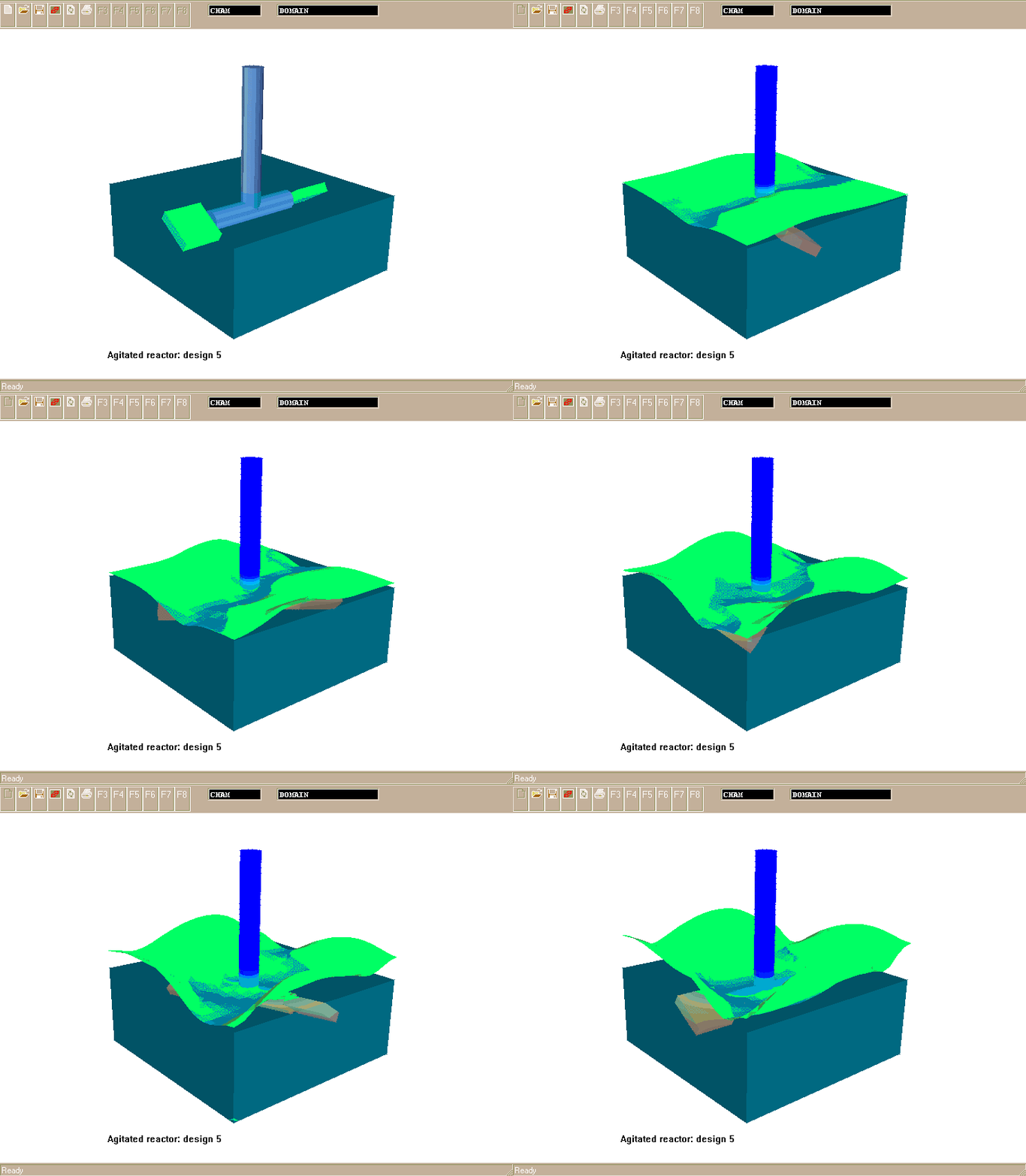 a stirred tank
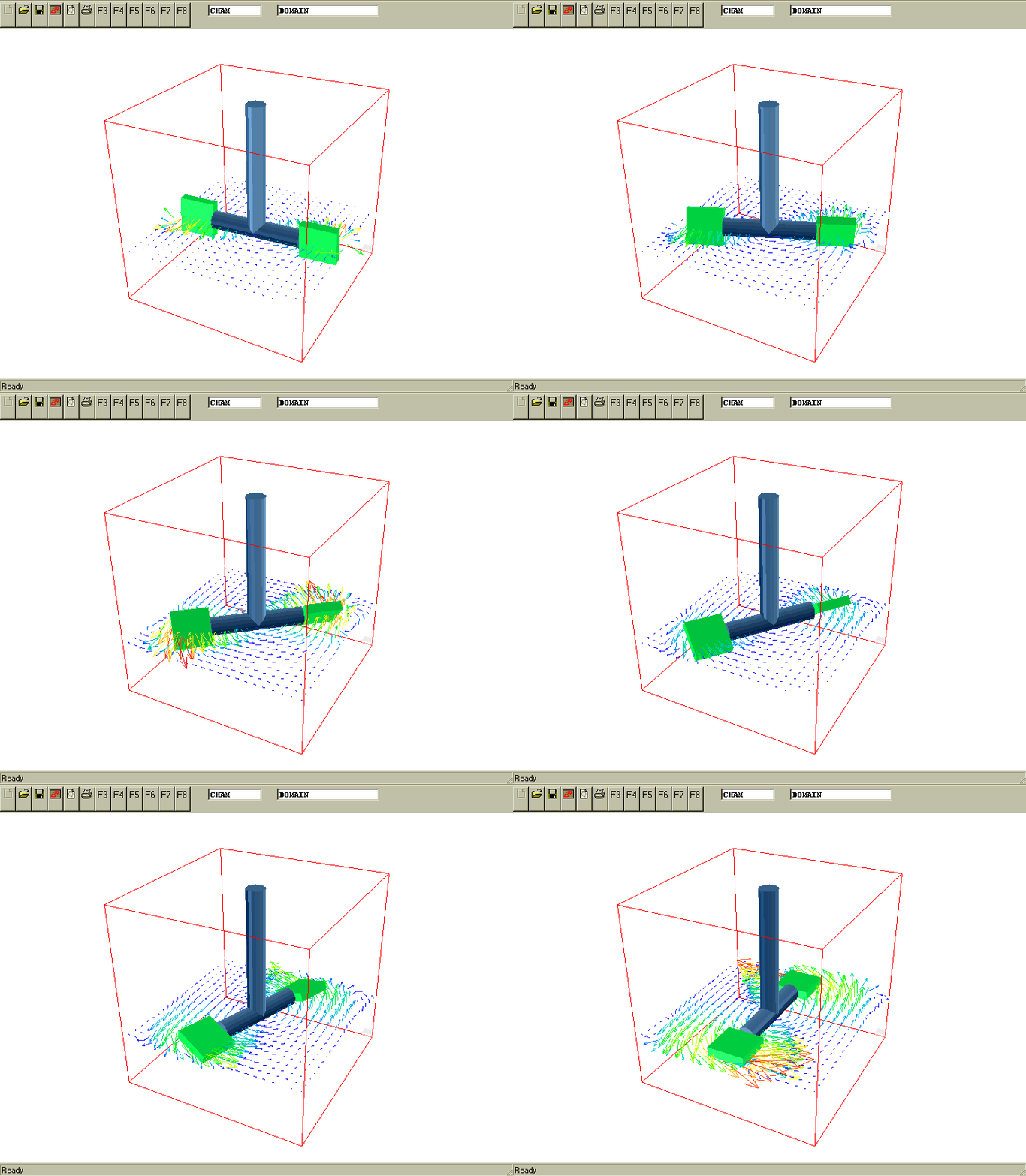 and a rotating paddle
Such simulations are very difficult, and perhaps impossible, for
computer codes which try to make the grid move with the object.
2.8 The
parabolic option
Whereas all of the competing codes are constrained to use full
three-dimensional grids and storage for all (3D) simulations, the
unique parabolic option
of PHOENICS enables many practically important flows (eg in pipes, smoke
plumes, and boundary layers on aircraft wings) to be handled much more
economically, and therefore accurately.
The following simulation of smoke movement in a long tunnel, with a
million-node grid, for example, was performed in this way, long ago, on a 386 lap-top computer.
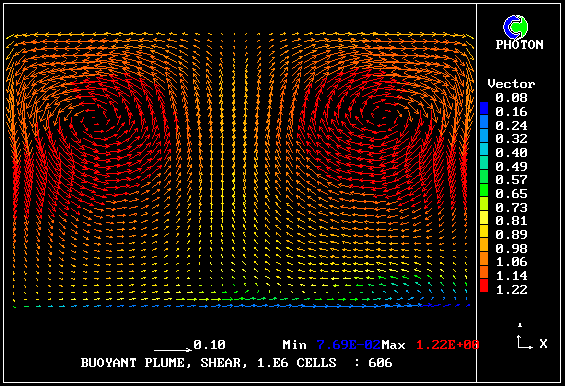
It was recently used for the simulation of the plume of oil-polluted
water rising above the wrecked PRESTIGE oil tanker on the floor of the
Atlantic.
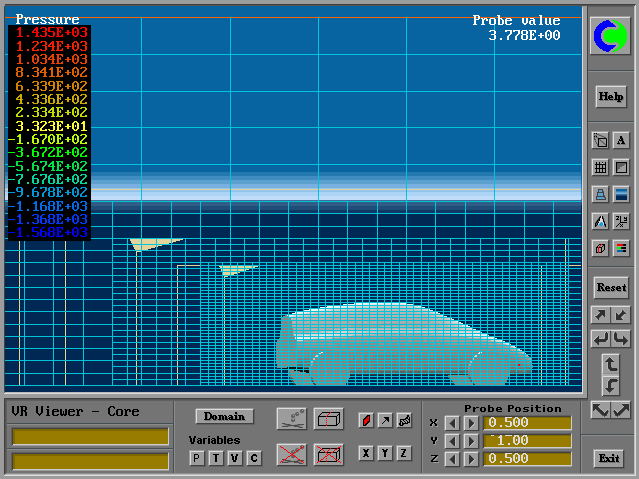
2.9 Fine-grid embedding
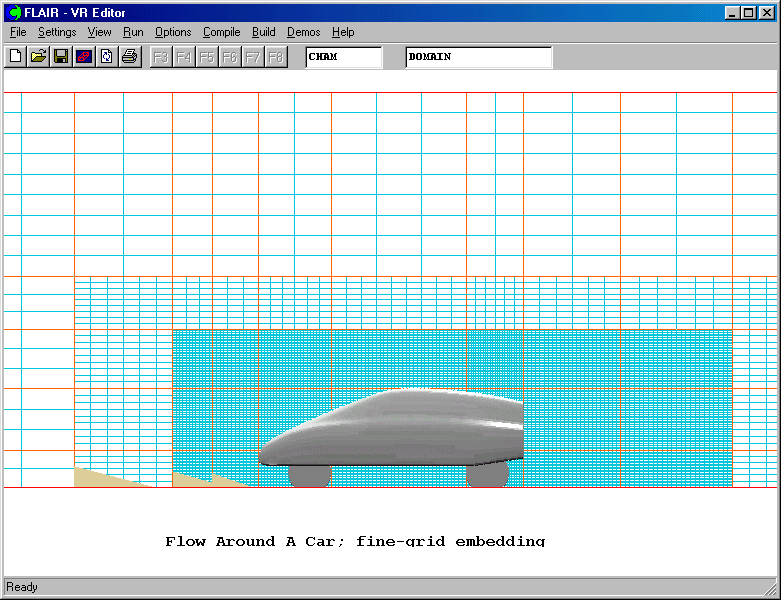
Although PHOENICS has a fully-unstructured-grid capability, local grid refinement is possible when a structured grid is in use, by way of
"fine-grid embedding",.
The following picture illustrates the use of this feature for simulating
the flow around an automobile displayed in the Virtual-Reality interface
(also a unique feature of PHOENICS):
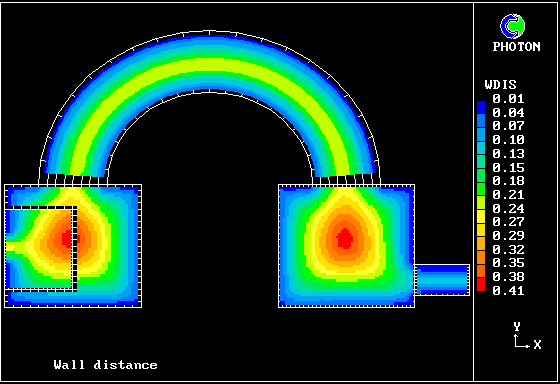
2.10 Wall-distance and -gap calculation
The influence of solid walls on the flowing fluids which they
surround is of such importance that flow-simulation codes need to
be able to calculate, for each point within the fluid;
- its distance from the nearest wall; and
- the distance between nearby opposite walls.
For example, if flow between parallel plates is in question, and the
Nikuradze formula for effective viscosity is to be used, the
former is the distance from the nearer wall, and the second is the
distance of one plate from the other.
Other turbulence models, e.g. Lam-Bremhorst, require at least the
first of these; and the IMMERSOL radiation model requires the second.
PHOENICS possesses a unique (unless recently copied) method for
calculating the two quantities in an economical manner; it involves
solution of the
LTLS equation.
2.11 Radiative heat transfer
Thermal radiation is so important a mode of heat transfer that most codes
have some means of simulating it. Only PHOENICS however possesses
the economical and realistic
IMMERSOL model,
which calculates the radiative transfer between arbitrarily-shaped solids
immersed in fluids which may or may not themselves emit and absorb
radiation.
This, like the LVEL model described below, makes use of the
also-unique
LTLS method of calculating distances from and between walls.
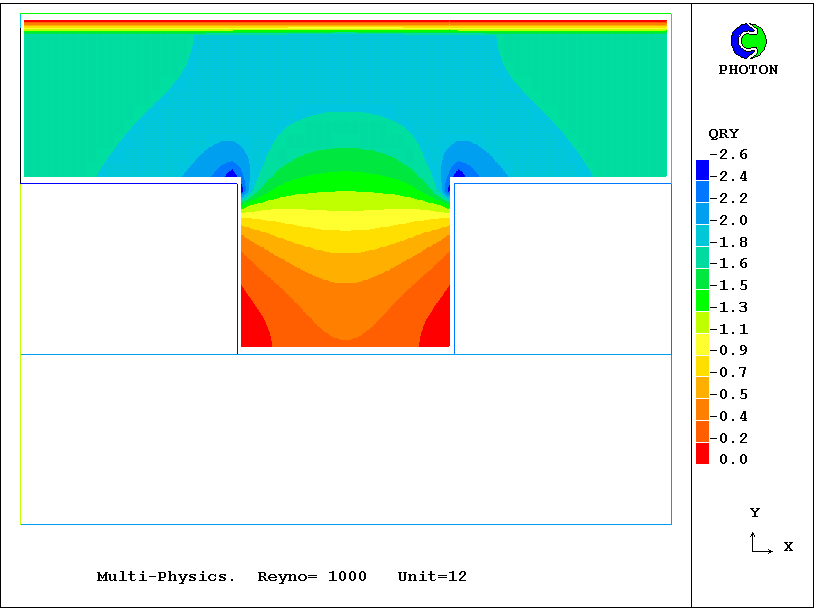
Below is a contour plot of the vertical-direction radiation flux, computed
by way of IMMERSOL, for the same case as was mentioned above in respect of solid stress.
2.12 Turbulence: the LVEL model
Whereas some codes are confined to a single turbulence
model,
PHOENICS has a
very large number, including several which are unique.
The already-mentioned
LVEL model is one; and it is perhaps the only model which
provides a satisfactory compromise between physical realism and
computational economy for flows in spaces 'cluttered' with solid
objects, when the Reynolds number is not abnormally high.
2.13 Turbulence: the MFM model
Another of the unique-to-PHOENICS, the
"multi-fluid model"
may prove to be of most long-term importance; for it allows the
hitherto-intractable
turbulence-chemistry-interaction problem to be resolved economically
for the first time.
It computes "probability-density functions" (PDFs) such as that
reproduced
on the left-hand side of the diagram below.
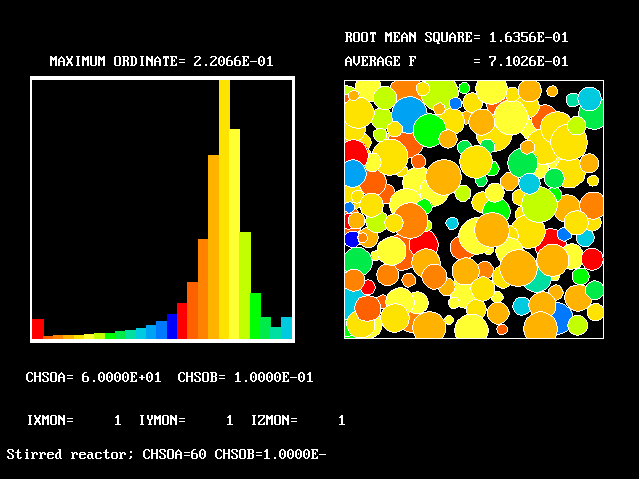
All competitive codes, it appears, used the "presumed-PDF" method.
In other words, they make guesses rather than calculations.
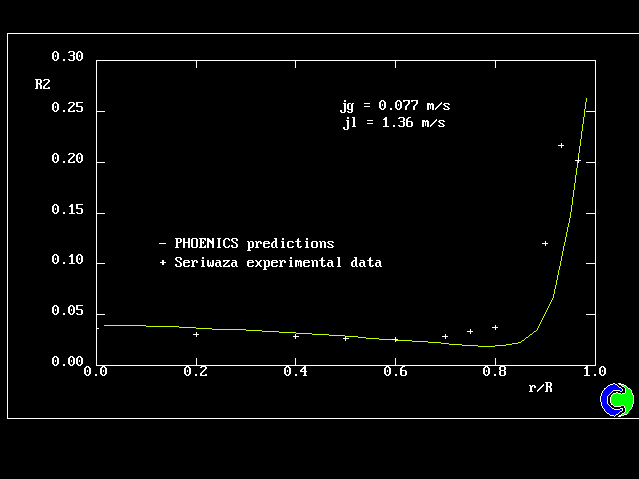
2.14 How many phases
Whereas some codes are confined to single-phase flows (eg air or water
alone, but not a mixture of the two), PHOENICS can handle
multi-phase flow as well, as indicated by the following example:
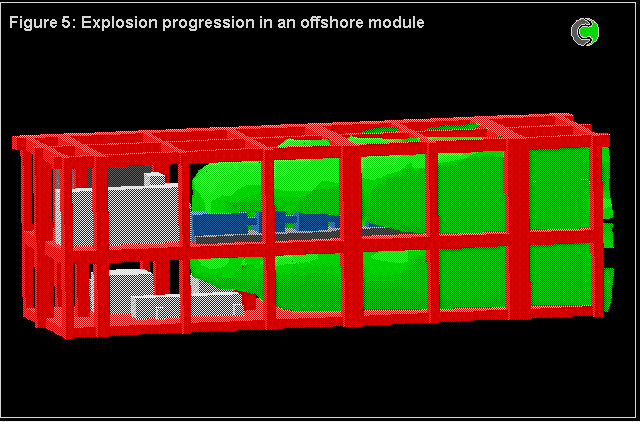
2.15 Chemical reaction
Whereas some codes are confined to chemically-inert flows,
PHOENICS can handle those which
react chemically as well, as is shown by the
following simulation of an oil-platform-explosion:
2.16 The input-file library
Because PHOENICS has been in continuous use for more than 20 years,
tens of thousands (more probably millions) of calculations have been
performed with its aid.
The data-input files corresponding to a tiny fraction (but still
several thousand) of these have been included with each delivered
PHOENICS package, in the form of an
input-file library.
One of the methods which can be adopted by users faced with a new
simulation problem is therefore to search through the library for
files which solve problems akin to their own, one of which can be
adopted as the starting point for the new study.
Concluding remarks
The above list of unique or especially strong features of PHOENICS
is far from being exhaustive. Some others will be mentioned in the
present document. Others are described in the PHOENICS
on-line-information system,
POLIS.
3. The components of PHOENICS
3.1 The main modules, for input, data-processing and output
PHOENICS performs three main functions:
- problem definition (i.e. pre-processing), in which the user
prescribes the situation
to be simulated and the questions which are to be answered;
- simulation (i.e. data-processing), by means of computation,
of what the laws of science imply in the prescribed
circumstances;
- presentation (i.e. post-processing) of the results of the
computation, by way of
graphical displays, tables of numbers, and other means.
PHOENICS therefore, like many but not all CFD codes, has a distinct software module, or set of modules, for each of the above three functions.
This sub-division allows
functions (1) and (3), say, to be performed on the user's home
computer, while the power-hungry function (2) is carried out remotely.
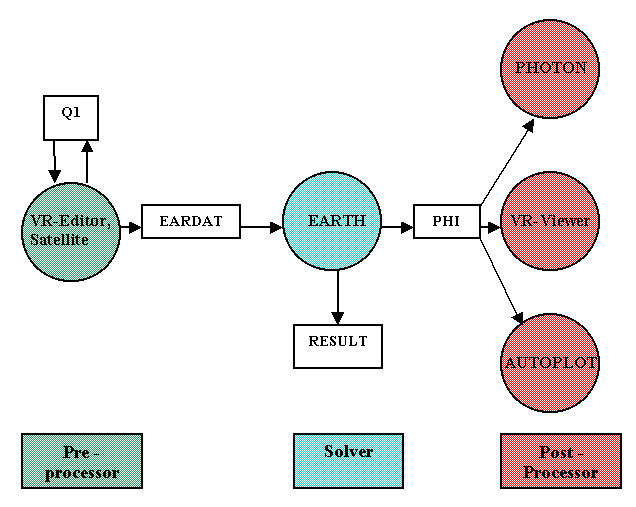
The three (sets of ) modules of PHOENICS are called:-
- SATELLITE (which incorporates also the Virtual-Reality Editor and Viewer)
- EARTH (the solver module); and,
- PHOTON (which incorporates the graph-plotter, AUTO-PLOT).
Their interrelationships are shown below, albeit with the VR-Viewer displayed on the post-processing side, even though it is part of the SATELLITE module.
3.2 The inter-communication files
The four names in white rectangular boxes in the above diagram refer to files which are used for communication between modules, as follows:
- Q1, the user-readable input-data file, which is written in
PIL, the
PHOENICS Input Language, and is the main expression of what the user wishes
to achieve.
- EARDAT, an ASCII file which expresses in EARTH-understandable form
what the user has prescribed by way of Q1.
- PHI, which is written by EARTH in accordance with a format which
enables PHOTON, AUTOPLOT and the Viewer to display the results of the
computation graphically.
- RESULT, which is an ASCII file expressing the results in
tabular and line-printer-plot form.
It is the Q1 file with which the user has most to do, whether it
is:
- taken from the extensive Input-File library which forms part of
the PHOENICS installation; or
- created by way of a text editor, perhaps as a modification of a
library file; or
- created as part of an interactive SATELLITE session in which the
user enters PIL statements at the keyboard, and is assisted to
do so correctly by acceptance and non-acceptance responses; or
- created without the user's needing knowledge of PIL, by way of
the VR-Editor, with its associated menu system.
However it is written, the content of the Q1 file is what
dictates how the flow-simulating calculation will proceed.
3.3 Auxiliary modules
SATELLITE, EARTH and PHOTON can be run by issuing the appropriate
commands (sat, ear or pho at the command line
of Windows or Unix, or by double-clicking on the appropriate line of the
Windows desktop.
CHAM has however also provided, for the convenience of users, other
means of activating the programs, either
individually or in sequence.
It is in fact an enhanced SATELLITE module working in VR-Editor mode.
There are other modules which, in this overview document, it is
appropriate to mention only in passing. They are:
- ShapeMaker,
which facilitates the creation of faceted objects, around which flow
can be computed, and which can also be displayed visually in the
"Virtual-Reality interface";
- DatMaker
, a utility which creates .dat files suitable for use with the PHOENICS Virtual-Reality User Interface,
from possibly-defective STL and other CAD files produced by CAD and architectural packages.
- the PLANT Menu, which facilitates
the selection and creation of formulae which are to be automatically
translated into Fortran by the PLANT feature of the SATELLITE;
and
- other utilities
for compressing or "filleting" data files.
3.4 Additional files
Other files of importance, in alphabetical order,include:
- CHAM.INI, into which users can insert decisions about modes of
operation which they wish only seldom to modify;
- CONFIG, which contains the crucial 'unlocking string';
- FACETDAT, which is created by SATELLITE, and which contains the geometrical information about the
those objects which are described by way of facets;
- GROUND.HTM, a Fortran file which is accessible to users, and
contains slots for the introduction of the user's own coding
sequences;
- PHOLOG, which records the key-strokes made during a PHOTON session,
in case they need to be repeated;
- PBCL.DAT, which is created by EARTH and which is used for recording information, useful for
displaying results, about partially-blocked cells,
- Q1EAR, which is created at the end of a SATELLITE run and which records,
in standardised format, all the implications
of the Q1 file for a particular run.
- Q2, which, being read by SATELLITE after Q1 and, if it takes place,
the interactive session, can contain the user's after-thoughts;
- U, from which PHOTON can read display-eliciting commands;
- XYZ, which contains the co-ordinates of all cell corners of a
'body-fitted-coordinate' grid.
- direct-access forms of the sequential files PHI and XYZ, namely PHIDA and XYZDA.
Information about some of these will be supplied later in this
document; and all of them are described in the PHOENICS
Encyclopaedia.
3.5 The options
For reasons which are now mainly historical, the coding and the
input-file libraries of the EARTH (i.e. solver) module of PHOENICS are
arranged in segments called "options".
Newcomers to PHOENICS are bound to encounter some mention of the options,
and may suppose their existence to be more important than it is.
Therefore the following account is provided.
The original purpose of options was to enable purchasers of PHOENICS
licences to reduce their expenditure by taking the "core"; but none, or
few, of the options.
Nowadays all options are supplied always.
The names of the options are:
- advanced-multiphase
- body-fitted-coordinate
- advanced-chemistry
- GENTRA (particle tracking)
- multi-block and fine-grid-embedding
- multi-fluid
- advanced-algorithms
- PLANT fortranizer
- advanced-radiation
- simultaneous-solid-stress
- advanced-turbulence
- two-phase
wherein the word 'advanced' is used when the core already
includes some capabilities of the kind indicated.
Correspondingly:
- the d_earth directory of PHOENICS has d_core, d_opt and
(somewhat anomalously) d_vr sub-directories
- d_core contains open-source Fortran files, and a sub-directory
called INPLIB which contains the core input-library files
- d_opt contains sub-directories:
- d_advmph
- d_bfc
- d_chem
- d_gentra
- d_mbfgem
- d_mfm
- d_numalg
- d_mig
- d_plant
- d_rad
- d_solstr
- d_turb
- d_twophs
- each of these sub-directories contains (or may contain)
open-source Fortran files; and
- each also contains a sub-directory called INPLIB.
- d_vr contains only a sub-directory called INPLIB, which holds
many, but not all, of the library cases which were created by
means of the VR-Editor.
As far as the coding is concerned, these names do
indicate where the relevant Fortran files are to be found.
However the correspondence between the option names and the contents
of the input files is much less direct, for the simple reason that
practically-interesting flow simulations often involve several
"optional" features, for example two-phase flow and combustion
and body-fitted coordinates.
4. Modes of operation
4.1 Distinguishing the modes
PHOENICS modules can be operated in various manners, the choice of which
depends on the user's personal preference, experience, and current needs
and circumstances.
The following remarks, which are intended to facilitate the proper choice
for the problem in hand, are organised under the headings:
- command
- Q1-editing
- text-interactive
- menu-interactive
- PLANT-using
- own-Fortran-using
- input from CAD
- input from grid-generation packages
- output to third-party graphics packages
- mixed
4.2 The command mode
By command mode is meant the entering of commands at the DOS or
UNIX prompt by way of the keyboard, no other response being expected but
that of execution.
The command mode is appropriate for what might be called
"production runs", i.e. those flow-simulating calculations for which:
- the input data have already been determined, and are embodied in
identified Q1 files;
- the nature of the required output has also been settled, and is
expressed either in the Q1s themselves or in "macros", i.e. (U
files) for PHOTON;
- there is no requirement for the user to intervene in the
calculation process.
This mode is preferred by users who, perhaps having spent some
day-time hours preparing a series of Q1s, wish to have the runs
executed overnight, possibly by way of the PHOENICS
"multi-run" facility.
CHAM's quality-control procedures, for example, entail the performance
of many
hundreds of such "test-battery runs" each night, followed by comparison
of the results with those which are expected, so as to detect whether
any change made to the software has had an inadvertent consequence.
However, newcomers to PHOENICS may also wish to use the command
mode at
the start, confining themselves to executing ready-to-run cases, or 'active demos' via the
Environment.
The commands supplied with the PHOENICS installation are described in
the scripts entry
of the PHOENICS Encyclopaedia; but the user is of course free to embody
these into others which he or she prefers.
4.3 The Q1-editing mode
What happens in a flow-simulating calculation made by PHOENICS is,
as has been already stated, entirely controlled by the contents
of the Q1 file, expressed via the PHOENICS Input Language, PIL.
Many users, especially those having months or years of experience,
therefore prefer to take full control of the calculation by writing
the Q1 for themselves.
However, even new or infrequent users, who are likely to prefer one of the
interactive modes of operation, may like to know that these modes
are there only to make Q1-writing easy.
The merits of the Q1-editing mode of operation are:
- speed, especially if the required Q1 can be created by making
minor changes to one which has been used successfully before,
for example one of the many hundreds in the PHOENICS Input-File
libraries supplied with the installation;
- certainty that no well-meant but inappropriate settings made by the
writers of the menus can have over-written what the user
intended;
- freedom for the user to employ his or her personal style and to
include helpful annotations;
- the ability to exploit the numerous features of PIL which
cannot be
introduced interactively; for example:
- DO loops
- IF ..... THEN .... ELSE constructs
- file-handling statements such as INCL and INTRPT
- DISPLAY ....ENDDIS
- PHOTON USE ...ENDUSE
- GOTO .... LABEL
- READVDU
- MESG(
- The wide range of commands which are associated with
In-Form,
the powerful new Input-of-FORMula feature.
and many others.
The disadvantage, of course, is that knowledge of PIL is needed; and
this can be only gradually acquired.
However, those who intend to become serious long-term users of PHOENICS, and
to exploit more than the most superficial of its flow-simulating
capabilities, should recognise that they may need to master at
least the rudiments of PIL; for the VR Editor can not do everything
for them.
Full information about
PIL can be found in the
PHOENICS Encyclopaedia.
There also exist some
PIL tutorials.
It may be remarked that the Q1-editing mode can also control the
subsequent running of PHOTON; for this is so programmed that, if
there exists in the local directory a file called "u" or
"U", it
will take instructions from it.
Then, if that file contains simply the line: "USE Q1", PHOTON will
look in the Q1 file for, and obey, instructions between the lines:
PHOTON USE
and
ENDUSE.
Many input-library Q1s contain such PHOTON-instruction sequences.
The VR-Viewer can also use such Q1 files as macros to display a similar sequence of images.
4.4 The text-interactive mode
The PHOENICS SATELLITE module can be caused to run in such a mode
that, once the existing Q1 has been interpreted, the program
awaits the entry of further PIL statements by way of the keyboard.
The relevant commands are txt.
The new statements, if they contain no errors, are then accepted as
augmenting or replacing the existing statements; and
they are added to the end of the Q1 file.
If the new statements infringe the rules of PIL in some way, they
are rejected; then an explanation of the reason for rejection
appears on the screen.
The text-mode SATELLITE also permits the introduction, modification
or deletion of lines which are not immediately interpreted; for it
has its own built-in Q1-editor.
[Therefore what has been said above about the inability of the
interactive mode to introduce DO loops and other features is
somewhat too strong; for they can be introduced via the built-in
editor, in text-interactive mode.
However most users nowadays prefer to use a stand-alone text editor for
creating all but the simplest Q1s.]
It should be remarked that PHOTON can also be run in
text-interactive mode, which is indeed the default. Commands typed
at the keyboard, so long as they are among those recognised by
PHOTON, are responded to immediately.
A list of such commands is provided by the
PHOTON HELP file.
PHOTON also has the facility to record the user's actions in a
pholog file, which can be later hand-edited and re-named as a
u macro. Similarly, the VR-Viewer can save a macro file which can
then be used to re-create the same image from another data set.
These facilities are valuable because of their person-time-saving
potential. Interacting with a graphical-display package is often
enjoyable; but, since humans cost more than computers, it can be the
most expensive part of a CFD-using operation.
4.5 The menu-interactive mode
The second method of interactive problem specification is via the
SATELLITE menu, which is usually, but not necessarily, associated
with the use of the VR-Editor; the latter represents visually what the
already-accepted data are.
This mode can be entered:
- from the DOS or UNIX command prompts;
- from the text-interactive mode by issue of the appropriate PIL
commands;
- from the Environment by clicking on the
appropriate buttons.
The advantage of using this mode is that some settings are made by
simple mouse-clicks, and others by typing numbers into boxes; so it
can be used by those who have no knowledge of the nature or meaning
of PIL variables or the syntax of the statements which set their
values.
The disadvantage is, as already mentioned, that only a sub-set of
the desirable PIL settings can be made in this way; and moreover:
- not only
can logic-using PIL statements such as DO loops not be inserted,
- those which are already present in the Q1 when the interactive
session starts will be omitted from the Q1 which is finally
written.
The use of this mode of problem specification is described in
TR 324,
for beginners and in
TR 326,
for more advanced users.
PHOTON also can be operated in menu mode, as well as text mode. This
is convenient for users who do not remember, or have never learned,
what are the commands which PHOTON otherwise needs.
The VR-Viewer, which is the alternative results-display module, and
which has the merit of giving the flow domain an appearance which
is wholly compatible with that presented by the VR-Editor, can be
operated in menu mode, or it can read commands from a macro file.
4.6 The PLANT-using mode
For those users (a diminishing proportion, it may be remarked) who find
the already-described methods of problem-specification insufficient,
the next recourse is to introduce PLANT formulae into the Q1 files,
and so allow the SATELLITE to:
- interpret them;
- convert them into their Fortran equivalents; and
- write the corresponding 'GROUND' file.
Thereafter the file is compiled, the new EARTH executable built,
and the run executed, without further user intervention.
The PLANT lines can be introduced into the Q1 file in either of two
ways, namely:
- direct editing, which requires some acquaintance with
PLANT-formula terminology and syntax, and
- interaction with the PLANT-menu utility, which does not.
4.7 The own-Fortran-using mode
There do exist PHOENICS users who would rather introduce their
own Fortran coding than find out whether, or how, what they want can
be provided by PLANT.
Such users need to learn how GROUND coding interacts with EARTH;
but this is not difficult, because the extensive open-source
components of PHOENICS provide many examples which users can follow.
Further, PHOENICS is equipped with numerous 'service' subroutines,
calls to which can be incorporated into the user's coding.
The
relevant entry in
the PHOENICS Encyclopaedia provides further explanations and
examples.
4.8 Input from CAD
Very often, CFD analysis is required for a situation which has been
already defined geometrically by way of a Computer-Aided-Drawing
(CAD) package.
The definition is then usually expressed by way of one or more STL or
DXF files, which it is necessary to import into PHOENICS.
This task is made extremely easy for the user, because The PHOENICS
SATELLITE is itself able to read STL and DXF files, and to convert them
into the format which it employs for display in its Virtual-Reality
Editor and Viewer.
The details of how this is done are explained in the
PHOENICS-VR Reference Guide, TR 326.
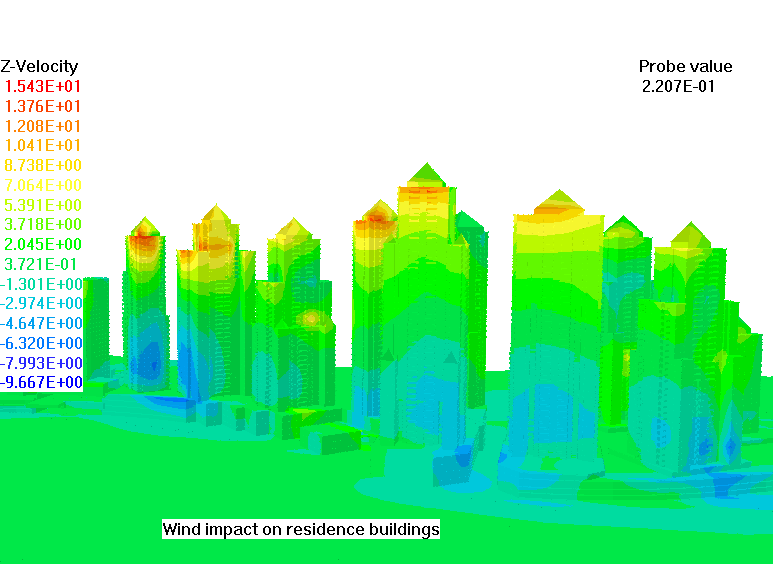
Below is shown an example of residential buildings displayed in
the VR-Editor. The CAD file was created by way of the well-known AUTOCAD
package. This CAD file in STL format was polished by PHOENICS, and then
imported into PHOENICS-VR in a few seconds, rotated, and somewhat
re-sized.
4.9 Input from grid-generation packages
The PHOENICS SATELLITE has its own several ways of creating
body-fitted-coordinate grids; and such grids can be created also via
PLANT or by means of user-created Fortran coding attached to EARTH.
However some users prefer to use a third-party grid-generation
package .
4.10 Output to graphics-display packages
Typical of the third-party graphics packages with which PHOENICS
can interact is
TECPLOT,
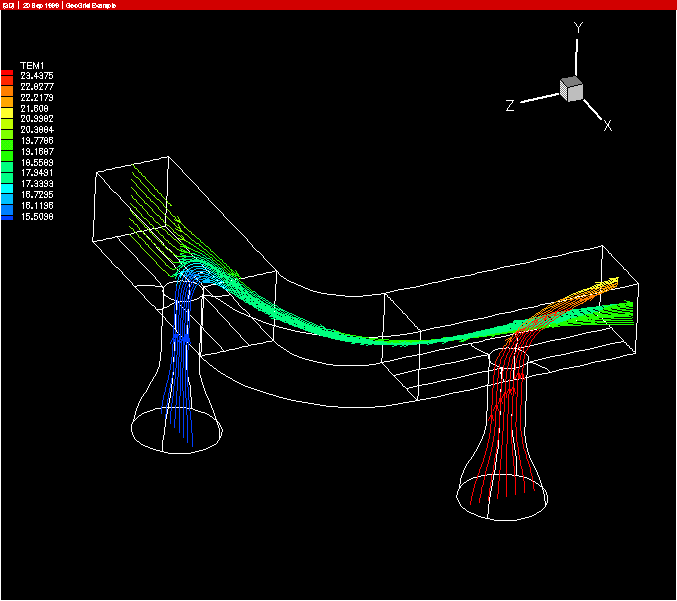
The following picture shows streamlines in a duct into which flow
two streams from transverse ducts. The computational grid was
created with the aid of GeoGrid; PHOENICS was used in multi-block
mode; and the graphics display was prepared by means of TECPLOT.
4.11 The mixed mode
There is no "mixed mode" as such. This section is therefore provided
simply as a place for stating that experienced users of PHOENICS rarely
use one mode only; and that they are certainly not forced to do so
by PHOENICS.
Indeed, users of PHOENICS are more likely to complain about the
over-large range of different ways which PHOENICS offers for
doing essentially the same thing.
It is for this reason that section 4 of the document has been
provided.
5. Getting started
By way of:
- the VR-Editor
- the command mode
Preliminary note
After installation of PHOENICS, four icons should be present on the desk-top,
entitled:
- PHOENICS-VR
- PHOENICS Command Prompt
- POLIS
The first two correspond to the next two sub-section of this
document; the third leads to the main on-line information source about
PHOENICS, of which the Encyclopaedia is the most-often used.
5.1 Getting started via the VR-Editor
Proceed by
studying the document
TR 324, "Starting with PHOENICS-VR", which is accessible by way of
the POLIS button and the 'documentation' and 'hard-copy
documentation' links to which it leads.
Those proceeding by this route are advised either to follow the
instructions printed in the hard-copy version of the document, if
they have one, or to
do so by keeping its
electronic copy open in a separate window.
A warning should be expressed at this juncture: despite the many
things that the VR-Editor can do, it cannot unleash
the full potential of PHOENICS.
Since newcomers to PHOENICS often have the desire to embark
immediately on some very ambitious flow-simulation tasks, they are
sometimes disappointed to discover that these cannot be launched from
the VR-Editor.
They will then need to dig a little deeper into the documentation,
helped if they so request by CHAM's user-support team, in order to
learn how the PHOENICS Input Language, and especially its In-Form
and PLANT features, will enable them to achieve their objectives.
They can however rest assured that there are few known flow-simulation
problems which PHOENICS can not solve.
5.2 Getting started via the command mode
Those users who prefer always to be in complete control of what they
are doing may prefer to start at the command prompt, and issue
simple commands only, until their confidence has grown sufficiently
to allow more complex ones.
The DOS command prompt can be brought to the screen by
double-clicking the 'windf' icon, the name of which stands (rather
inappropriately) for Windows Digital Fortran.
The working directory should then be found to be:
\phoenics\d_priv1.
Users whose practice it is to employ such auxiliary programs as
The Norton Commander, or FAR, may find it convenient to activate one
of them at this point. But this is not essential.
If the installation has been fully successful, the 'path' associated
with the Window should include:
\phoenics\d_utils and
\phoenics\d_utils\d_windf
However, if it does not, the full-path-name alternatives to the
commands mentioned below should be employed.
(a) A do-nothing run
In order to start the VR Editor in command mode, the command to issue
is: modq1, which places a
'model' Q1 file
in the local directory.
The DOS DIR command will reveal whether it is present. [If it is not,
try typing the full path-name of the command which is:
\phoenics\d_utils\modq1 ]
The command edit q1 will show the content of this file,
exhibiting the standardised data-group structure of PHOENICS, but
making no non-default data settings whatsoever.
A suitable command to issue next is txt [full path-name:
\phoenics\d_utils\d_windf\txt], which activates the
SATELLITE module in text-interactive mode. The resulting screen
image is as follows:
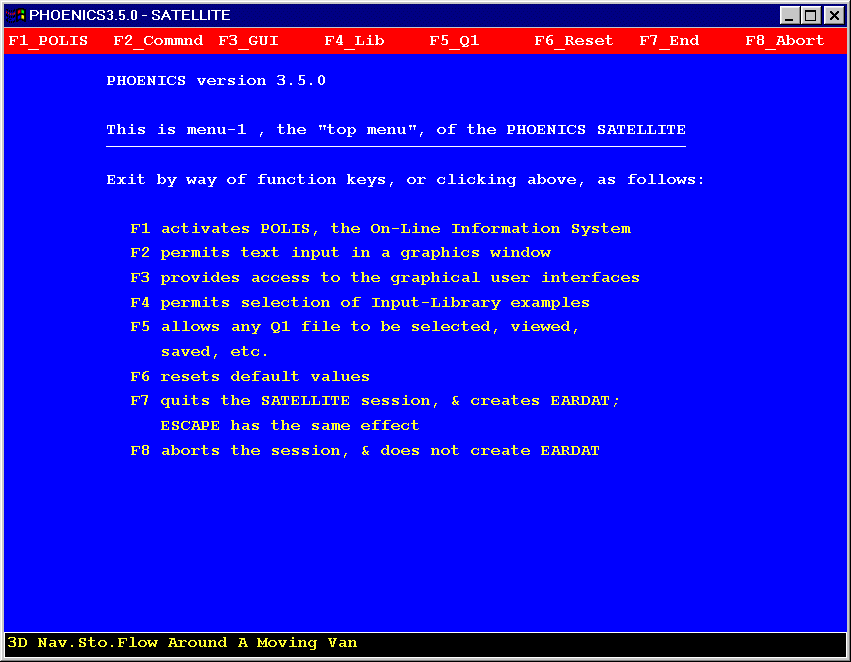
This gives the user an opportunity to enter data; but, if the
opportunity is not taken, and the session is immediately
terminated, it will be found that:
- the Q1 file has been left unchanged,
- a Q1EAR file has been created, in which all the settings are
the defaults, and
- that an EARDAT file has been created, of
which the same is true.
If then the command ear is issued, the solver module, EARTH,
will run; but it will terminate very quickly, producing a RESULT
file of which the small content indicates that no simulation has
actually been performed.
(b) Exploring the text-interactive SATELLITE
If the process is repeated, but this time the opportunity to insert
data interactively is taken, the methodical explorer will
probably proceed in small steps, for example as follows:-
- Pressing function-key 2 will cause the command mode to be entered.
- Entering: NX
will elicit the response: NX=1, which is the default value of the
number of grid intervals in the x-direction..
- Entering: NX=10 will set the value of that quantity
correspondingly.
- This can be confirmed by entering: NX
to which the screen's response will be:
NX=10.
- Entering: SOLVED
will elicit a screen response which indicates that no variables
are being solved.
- Entering: SOLVE(P1)
followed by: SOLVED
will produce a screen message which indicates that P1, which is
the first-phase-pressure variable, is being solved.
- These actions will have altered the Q1 file, the bottom of which
can be seen by entering:
LB
with the result that the screen shows:
NX=10
SOLVE(P1)
- In this way, step-by-step, a complete Q1 can be built up;
however short cuts can be taken. Thus, by entering:
LOAD(100)
the user can cause the Q1 to be augmented by the complete set of
commands which constitute core-library case 100.
- Thereafter he or she can:
- determine what the settings are by entering the names of the
variables;
- make settings by entering:
variable_name=value;
- by using the built-in editor and the I (for insert), L (for
list) and D (for delete) commands, make more elaborate
modifications.
This is not the place for a comprehensive presentation of the
PHOENICS Input Language,
PIL. However,
enough has perhaps been written to indicate its general character, and the
way in which the PHOENICS SATELLITE responds to it.
(c) Exploring the menu-interactive SATELLITE
If the command m2 is entered at the command prompt, the SATELLITE is activated in
"menu-2" mode.
What then appears on the screen is as shown below. It is the top panel
of the menu which is associated with, but is distinct from, the VR
editor.
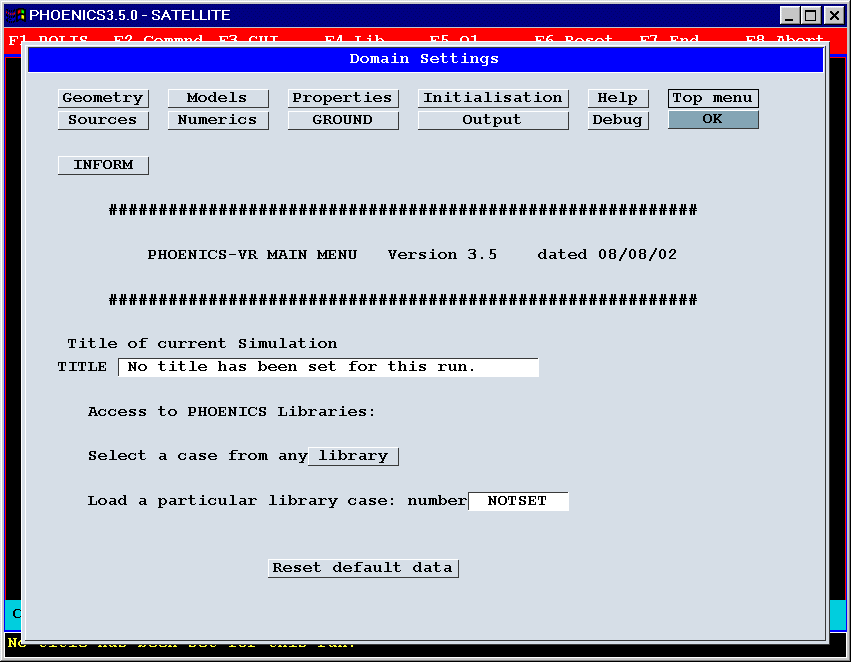
The exploration-minded user will wish to click on the buttons at the
top of the panel so as to access deeper levels, at which settings
can be made by mouse clicks or the typing in of numbers.
Then, having returned to click on OK, he or she will quit the program, and
thereafter examine the Q1 and Q1EAR files which have been created.
It will be observed from the above image that this menu does allow a
library case to be loaded, if its number is known. Then the settings
made by it are displayed in the appropriate boxes of the menu, and
can be altered by the user.
ear thereafter launches an EARTH run as before.
Then pho launches a PHOTON run; and
vrv activates the VR-Viewer.
6. Physical and mathematical content of PHOENICS
6.1 Conventional features
PHOENICS has all the features which are common to commercial CFD
codes; indeed it pioneered them. Since the present document is an overview rather than a
text-book, it has been judged sufficient here simply to list the
conventional features, under two headings, namely:
- physical, and
- mathematical.
Thereafter some of the less conventional features of PHOENICS will be
given more attention.
(a) Physical
- PHOENICS simulates flow phenomena which are:
- laminar or turbulent
- compressible or incompressible
- steady or unsteady
- chemically inert or reactive
- single- or multi-phase
- in respect of thermal radiation:
- transparent
- participating by way of absorption and emission
- participating by way of scattering.
- The space in which the fluid flows may be:
- empty of solids, or
- wholly or partially filled by finely-divided solids at rest
(as in 'porous-medium' flows), or
- partially occupied by solids which are not small compared
with the size of the local computational cells.
- In the latter two cases, the solids may interact thermally with
the solids (that is to say that PHOENICS can handle 'conjugate heat transfer').
- Such immersed solids can also participate in radiative heat
transfer.
- The thermally and mechanically-induced stresses and strains in
the immersed solids can also be computed by PHOENICS.
- The thermodynamic, transport (including radiative), chemical and
other properties of the fluids and solids may be of arbitrary
complexity.
(b) Mathematical
Click here for a more extended treatment.
- The equations solved by PHOENICS are those which express the
balances of:
- mass
- momentum
- energy
- material (ie chemical species)
- other conserved entities (e.g. electrical charge)
over discrete elements of space and time, i.e. 'finite volumes'
known as 'cells'.
- The cells are arranged in an orderly (i.e. "structured")
manner in a grid which may be:
- cartesian,
- cylindrical-polar, or
- "body-fitted", i.e. arbitrarily curvi-linear,
and which may be segmented into distinct "blocks".
- These equations express the influences of:
- diffusion (including viscous action and heat conduction),
- convection,
- variation with time,
- sources and sinks.
- In order to reduce the numerical errors which may result from the
unsymmetrical nature of the convection terms, PHOENICS can make use
of a large variety of 'higher-order schemes', including QUICK, SMART,
Van Leer, and many others.
- The dependent variables of these equations are thus:
- mass or volume fraction,
- velocity and pressure,
- temperature or enthalpy,
- concentration,
- electrical charge or other conserved property.
- The mass and momentum equations are solved in a semi-coupled
manner by a variant of the well-known SIMPLE algorithm.
- Because the whole equation system is non-linear, the solution
procedure is iterative, consisting of the steps of:
- computing the imbalances of each of the above entities for
each cell;
- computing the coefficients of linear(ised) equations which
represent how the imbalances will change as a consequence of
(small) changes to the solved-for variables;
- solving the linear equations;
- correcting the values of solved-for variables, and of
auxiliary ones, such as fluid properties, which depend upon
them:
- repeating the cycle of operations until the changes made to
the variables are sufficiently small.
- Various techniques are used for solving the linear equations,
including:
- tri-diagonal matrix algorithm
- (a variant of) Stone's 'Strongly Implicit Algorithm',
- conjugate-gradient and conjugate-residual solvers.
6.2 Simulation of multi-phase flow in PHOENICS
"Multi-phase flows" are those involving, to name but a few examples:-
- steam and water in a boiler,
- air and sand in a desert storm,
- fuel droplets and combustion gases in an engine,
- a layer of oil, floating on the surface of a river.
If on-line click here to see an example
PHOENICS was the first general-purpose computer code to be able
to simulate multi-phase flows; and it is still capable of doing so
more effectively, and in a greater variety of ways, than most of
its competitors.
Multi-phase-flow phenomena can be simulated by PHOENICS in four
distinct ways. These are:
- as
two inter-penetrating continua, each having at every point in
the space-time domain under consideration, its own:
velocity components, temperature, composition, density, viscosity,
volume fraction, etc;
- as
multiple inter-penetrating continua having the same range
of properties;
- as
two non-interpenetrating continua, separated by a free
surface;
(If on-line click here to see an example) or
- as
a particulate phase for which the particle trajectories are
computed as they move through a continuous fluid.
Details of how PHOENICS performs its simulations can be discovered
by on-line viewers by clicking on the above links to the
PHOENICS Encyclopaedia.
6.3 Turbulence models in PHOENICS
Why turbulence models are used
The flows which PHOENICS is called upon to simulate are, more often
than not, turbulent, by which is meant that they exhibit
near-random fluctuations, the time-scale of which is very small
compared with the time-scale of the mean-flow, and of which the
distance scale is small compared with the dimensions of the domain
under study.
Since the beginning of the practice of computational fluid dynamics,
in the 1960's, the impracticability (or, more precisely, the
prohibitive expense) of predicting these fluctuations has resulted in
the invention of "turbulence models" which represent, to some extent,
their results.
The subject is too large to deal with in this Overview; but the
lectures and other documentation provided with the PHOENICS package
contain much information. Typical is the lecture entitled
Turbulence models for CFD in the 21st Century.
Satisfactoriness
A broad-brush summary of the satisfactoriness of the most-widely-used
turbulence models is:
- for predicting time-average hydrodynamic phenomena and the
macro-mixing of fluids marked by conserved scalars, the models
are "not bad"; but
- for the simulation of micro-mixing, which is essential if
chemical-reaction rates are to be predicted, they are very poor
indeed; and
- the most distressing aspect of the last-mentioned point is that
it is not sufficiently recognised by the users of the models.
Turbulence models in PHOENICS
PHOENICS is particularly rich in turbulence models, as can
be seen from the relevant
Encyclopaedia Entry.
Two of these are of special interest, because they are unique to
PHOENICS, namely:
- The LVEL model
is most useful in circumstances in which many
solids are immersed in the fluid, making conventional
"two-equation" models impractical.
It handles the complete range
of Reynolds number smoothly; and it contains its own unique and
simple method for calculating the distances to and between walls.
If on-line click here to see an example
-
The "Multi-Fluid Model" (MFM) possesses more radical novelty; for
it provides a direct means of computing the quantities of
practical importance, so supplanting the conventional indirect
means.
MFM is especially useful for simulating turbulent-combustion
processes, about which several lectures are supplied with the
PHOENICS package, for
example
this, and
this.
6.4 Radiative-heat-transfer models in PHOENICS
PHOENICS is supplied with several means of computing thermal radiation,
all of which are described in the
PHOENICS Encyclopaedia
Entry
A method which is unique to PHOENICS, and is especially convenient
when radiating surfaces are so numerous, and variously arranged, that
the use of the view-factor-type model is impractically expensive, is
IMMERSOL.
If on-line click here to see an example
This method is:
- computationally inexpensive;
- capable of handling the whole range of conditions from
optically-thin (ie transparent) to optically-thick (ie opaque) media;
- mathematically exact when the geometry is simple; and
- never grossly inaccurate even when it is not,
examples of its use may be seen by clicking
here.
IMMERSOL is particularly useful for electronics-cooling
problems, and is an important feature of
HOTBOX.
6.5 Chemical-reaction processes in PHOENICS
From its beginning in 1981, PHOENICS has been used for
simulating processes involving chemical-reaction processes, and
especially those involving combustion.
It continues to be heavily used for these purposes, both by
CHAM and
others, e.g.
ESA.
PHOENICS can handle the combustion of gaseous, liquid (e.g. oil-spray)
and solid (eg pulverized-coal) fuels.
Chemical reactions are simulated by PHOENICS in several ways, including:
- SCRS,
"the Simple Chemically Reacting System" built into
user-accessible Fortran coding (which users may modify, but
need not even look at);
- CREK, a set of
user-callable subroutines which handle the thermodynamics and
finite-rate or equilibrium chemical kinetics of complex chemical
reactions;
- CHEMKIN 2,
the public-domain code to which PHOENICS has an interface,
- PLANT,
which enables users to introduce new reaction schemes and material
properties by way of formulae introduced into the data-input
command file, Q1.
6.6 "Parabolic, Hyperbolic Or Elliptic"
- The above words appear in the expansion of the
acronym, PHOENICS; and for good reasons, having practical significance.
- "Parabolic" flows are those, such as steady jets, boundary layers and
wakes, from which reverse flow is absent. If the Reynolds number
is not too low, all influences flow from upstream to downstream;
so the calculation can proceed in the same way.
If on-line click here to see an example
- PHOENICS, perhaps still alone among the general-purpose computer
codes, exploits this opportunity; the result is a great reduction
in computer time and memory requirements. In effect,
two-dimensional storage suffices for a
three-dimensional problem.
For further information, including graphical displays,
click
here if on-line c.
- Where the velocity is subsonic, use of the parabolic option
involves neglect (usually justifiable) of the cross-stream
pressure variations. However, where the velocity is supersonic,
this is no longer necessary.
If on-line click here to see an example
PHOENICS can handle these so-called
"hyperbolic" flows with the same economy as the parabolic ones.
Some examples may be seen by, clicking
here.
- Flows which are neither parabolic nor hyperbolic, i.e. all the
others, are called "elliptic"; for them, allowance has to be made
for influences to travel in all directions; so three-dimensional
storage must be used.
Since this is expensive, it should
be used only when necessary. PHOENICS, uniquely, enables the user to
make the choice.
6.7 Body-fitting in PHOENICS
- PHOENICS can use any one of three types of coordinate system for
describing the space in which it performs its computations, namely:
- cartesian,
- cylindrical-polar,
- curvilinear (but still with six-faced cells) for
fitting bodies of arbitrary shape.
- PHOENICS was the first general-purpose CFD code to be enabled
to compute flows around such bodies by using
"body-fitted-coordinate (i.e. BFC) grids"; and it still possesses
perhaps the widest range of means of doing so.
- PHOENICS possesses its own built-in means of generating such
grids; but it can also accept grids created by specialist
packages.
- Not all CFD codes have a BFC capability; and of those
which do not, some employ other means of permitting flows around
arbitrarily-curved surfaces to be accurately computed. PHOENICS
too has such a capability, called
PARSOL.
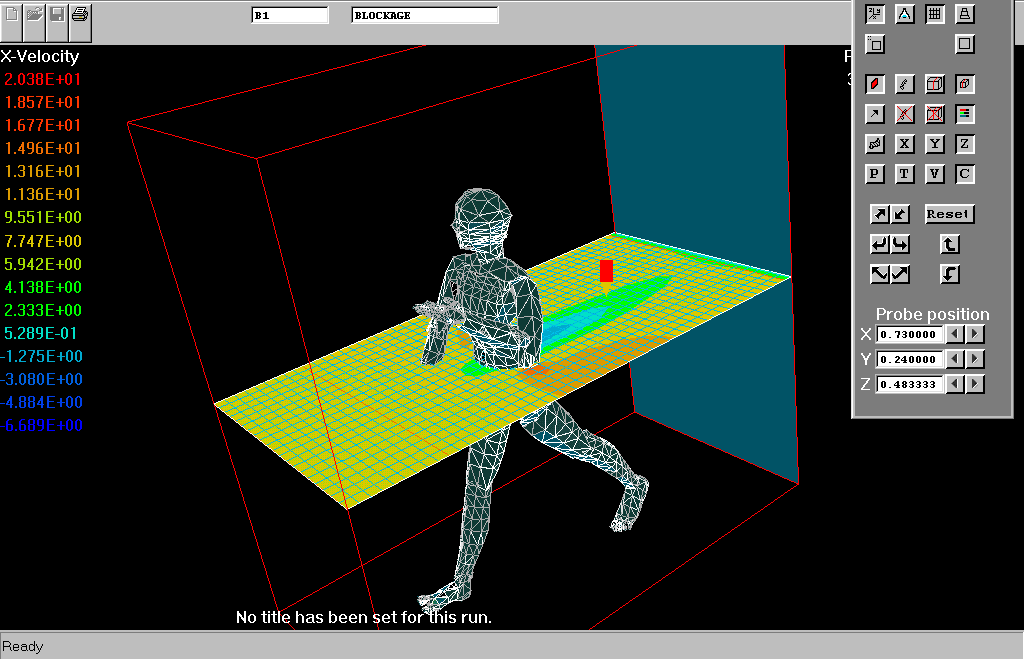
- PARSOL allows flows around curved bodies to be computed on
cartesian grids; and the solutions are often just as accurate as
those computed on body-fitted grids.
The following figure exemplifies the use of PARSOL for "body-fitting"
rather literally:
- The user of PHOENICS therefore can choose for him or her self which
method to use, according to requirements for accuracy, personal
preference and limitations of time.
6.8 Fine-grid embedding
- The first embodiment in PHOENICS of fine-grid embedding (FGEM)
was made in connexion with the
CCM (collocated covariant method),
which employed body-fitted coordinates.
- Subsequently, the FGEM method was generalised so that it could work
with any coordinate system, of which the cartesian grid,
being most commonly used, and computationally efficient, is perhaps the
most important.
If on-line click here to see an example
The creation of fine-grid regions is particularly easy now that it can
be effected by way of
the virtual-reality interface.
- The use of FGEM for the calculation of flow around an automobile is
illustrated
here.
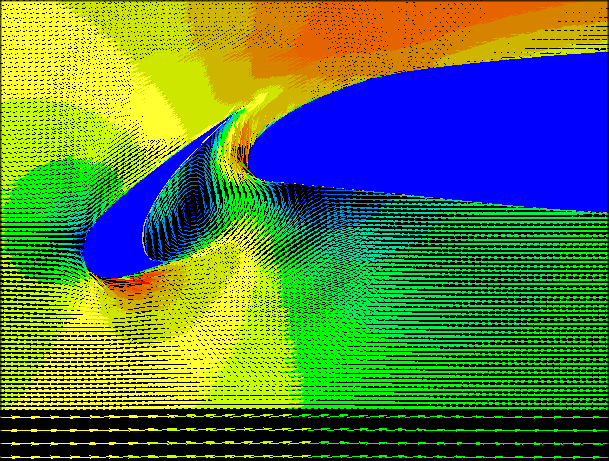
- Especially when combined with the
PARSOL (ie
partial-solid) technique, it makes the use of body-fitted coordinates
less-often needed, as the following, which shows an application to a
three-part airfoil, powerfully suggests:
6.9 Parallel PHOENICS
- The architecture of PHOENICS has proved to be especially well-suited
to parallelisation, because of the "slab-wise" arrangement of its
data-structure. This was adopted in the 1980s, as a means of
economising computer memory, which was necessary at the time.
- Although that need has disappeared, the slab-wise
arrangement made "domain-decomposition", the parallelization strategy
chosen by CHAM, especially easy to implement.
- Its most usual implementation involves "z-direction splitting", in
which the whole three-dimensional grid is broken into as many sub-grids
as there are processors available for use; however splitting in other
directions is also allowed.
- Transfer of information from one sub-grid to its neighbours is
carried out within the innermost iteration loops of the solution
algorithm.
- To ensure the efficiency of this transfer, a conjugate-gradient
solver is used.
- Information on performance can be obtained by
clicking here if on-line.
7. Special-purpose versions of PHOENICS
7.1 Introduction
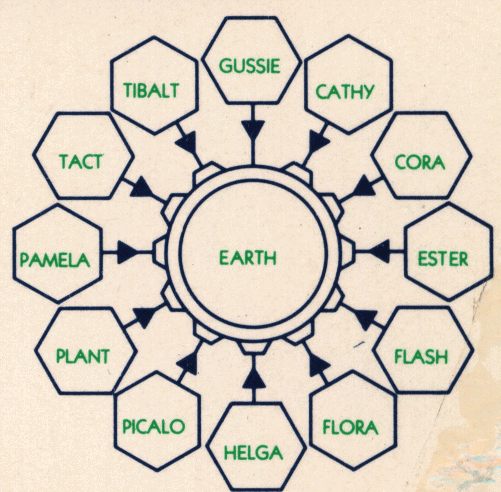
- PHOENICS was conceived from the start as a code series, as
the "S" in its
acronymic name bears witness.
- The concept derives from the recognition that the relevant laws of
physics, and the methods of solving their equations, being
universal, can be embodied in a single software package, which
can then be used for numerous special sectors.
- The concept is also reflected in the use of the names:
- "SATELLITE" for the data-input modules which would embody the
special-sector features, and
- "EARTH" for the "universal" equation-solving module with
which they would interact.
- The concept is illustrated by
the following picture,
from one of the earliest documents about PHOENICS.
- Although things have not worked out quite as foreseen (because
the SATELLITE module now also contains many universal features),
the basic idea has stood the test of time.
- The current list of special-purpose programs is as follows:
-
CVD
- A special-purpose version of PHOENICS has been created with the
collaboration of European partners: Siemens, the University of Delft,
and the Fraunhofer Institute.
-
ESTER
- Electrolytic aluminium smelters of the 'Hall-cell' type involve
complex interactions of:
- a layer of oxygen-gas bubbles in the vicinity of the anode;
- an upper fluid layer of molten electrolyte,
- a lower fluid layer of liquid aluminium,
- a bath-like container made of carbon,
- electrical currents and magnetic fields, and
- the force of gravity which ensures, usually, that the liquid
metal does not touch the anode.
The special-purpose PHOENICS program known as ESTER has been in
use for simulating the flows in Hall-Cell reactors for many
years.
-
FLAIR
- The flow of air, heat and smoke inside buildings and other
enclosures has been subjected to study by PHOENICS (and its
predecessors in this sector, MOSIE, and JASMINE) for many years.
This special-application area of CFD was one of those selected for
attention in the EC-funded MICA project, in which one of the
collaborating partners was the UK Building Research Establishment.
The lessons learned have been incorporated into the special-purpose
version of PHOENICS known as FLAIR, which is widely used by HVAC
(i.e. heating, ventilating and air-conditioning) engineers.
-
HOTBOX
- Electronic equipment needs to be kept cool if it is to perform properly.
Therefore the prediction of temperatures (and especially peak
temperatures) within it is of great importance for designers.
CHAM has been assisting electronics engineers with this for more
than a decade, its specific offering being the special-purpose code
HOTBOX.
This now uses the Virtual-Reality interface in order to facilitate
both the
setting up of problems and the display of results; and its use of
the IMMERSOL radiation model and the LVEL turbulence model enable it
to combine physical realism with computational economy.
8. Sources of further information
References have been made at many points in this overview to
sources of further information. Here therefore it should suffice to
make only a few summarising remarks, as follows:
- POLIS,
the On-line information system
When first devised, this was a stand-alone information-browsing
program. Now that web-browsers are available to all, the name has been
retained for a particular gateway into information supplied by
CHAM to the users of PHOENICS; this is now inspected by means of
the local browser. Much of the material is also accessible on CHAM's website.
- The
Encyclopaedia
This continuously growing body of information is intended to
provide, in accessible form, all the information that users of
PHOENICS are likely to need. That it fails to attain this near-impossible goal, its creators
freely admit; but the fact that it can be easily and instantly
up-dated, without the long waits associated with the production of
hard-copy documents, is the reason for CHAM's adopting it as a
major communication means.
- Help
is provided in various ways, especially for users of the SATELLITE
and PHOTON modules.
What is seen by clicking on the POLIS Help link is a collection of
items which can be accessed from the VR user interface.
-
The Applications Album
Many results of past uses of PHOENICS have been collected
together and arranged in a kind of 'museum' called the
'Applications Album'.
Some which are rather old, indeed 'museum-pieces' in another
sense, have been allowed to stay in order that visitors can
appreciate that CHAM and PHOENICS have been in the CFD business
for a long time.
-
Lectures and tutorials
CHAM's practice is to make as much as possible of its
descriptive and educational material available to its users.
The above link therefore leads not only to a series of lectures
which cover the main topics of PHOENICS in a systematic manner,
but also to 'occasional' lectures, i.e. those devised for
particular audiences and particular times.
End of TR 001